
SAP Finance Module
DOCS FOR SAP FICommands:
SAP FINANCEProcess Modeling:
Section titled “Process Modeling:”Finance Process Flow
Section titled “Finance Process Flow”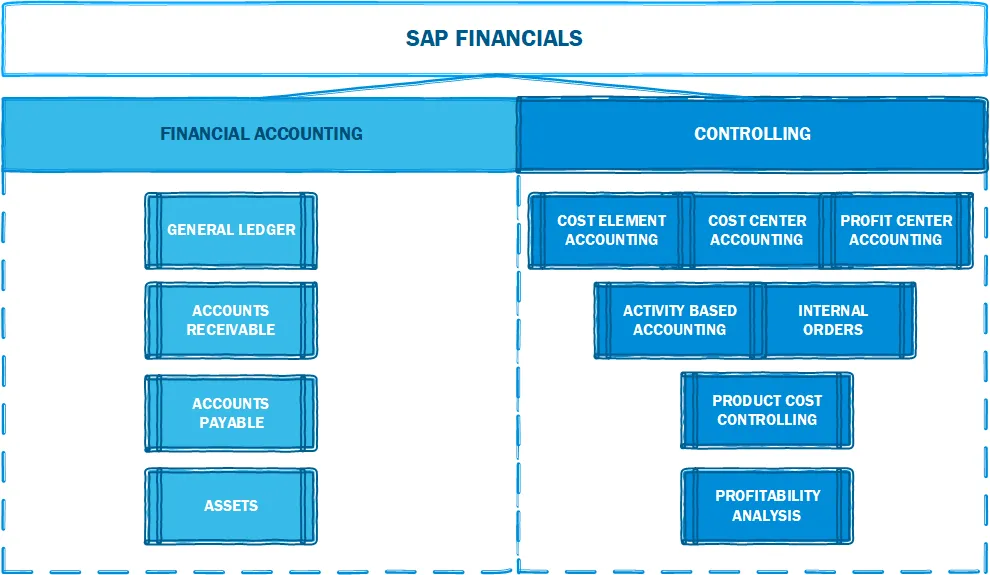
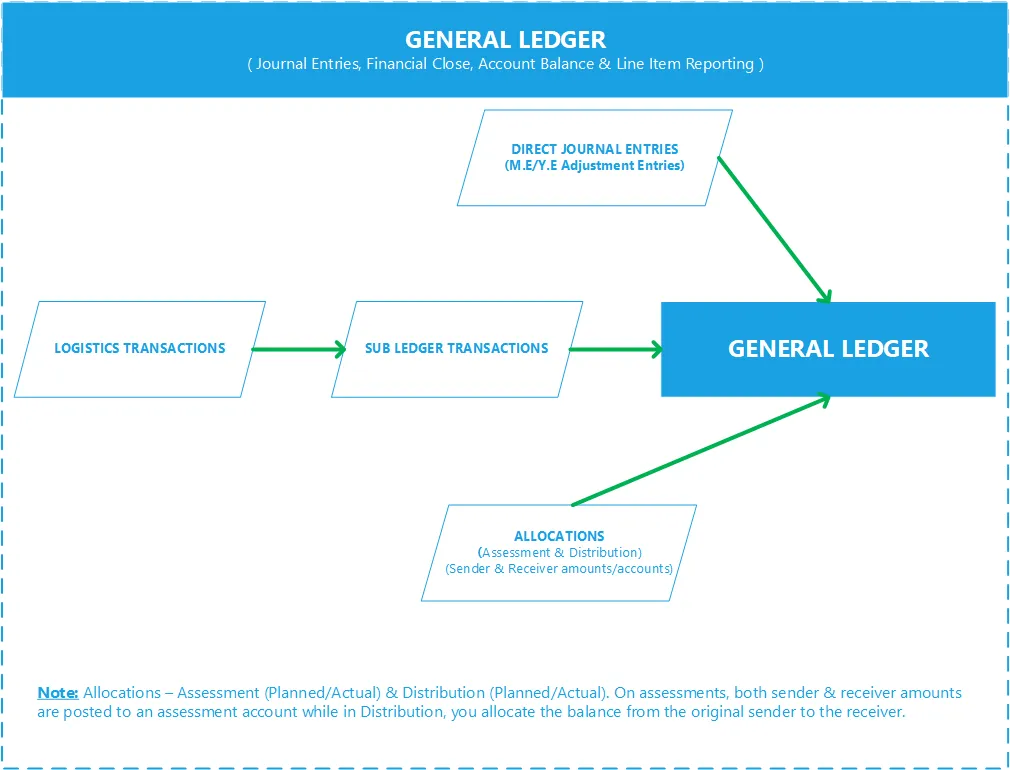
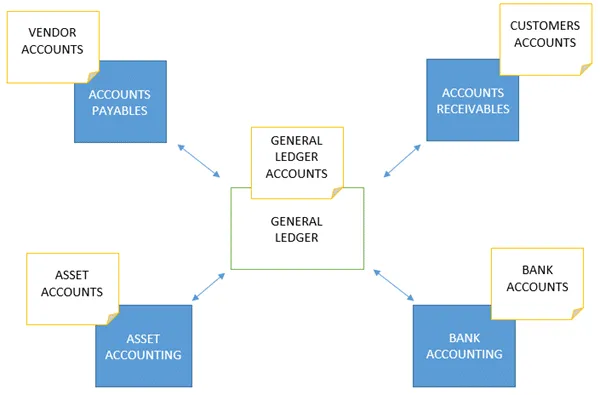
Group Reporting - Financial Consolidation
Section titled “Group Reporting - Financial Consolidation”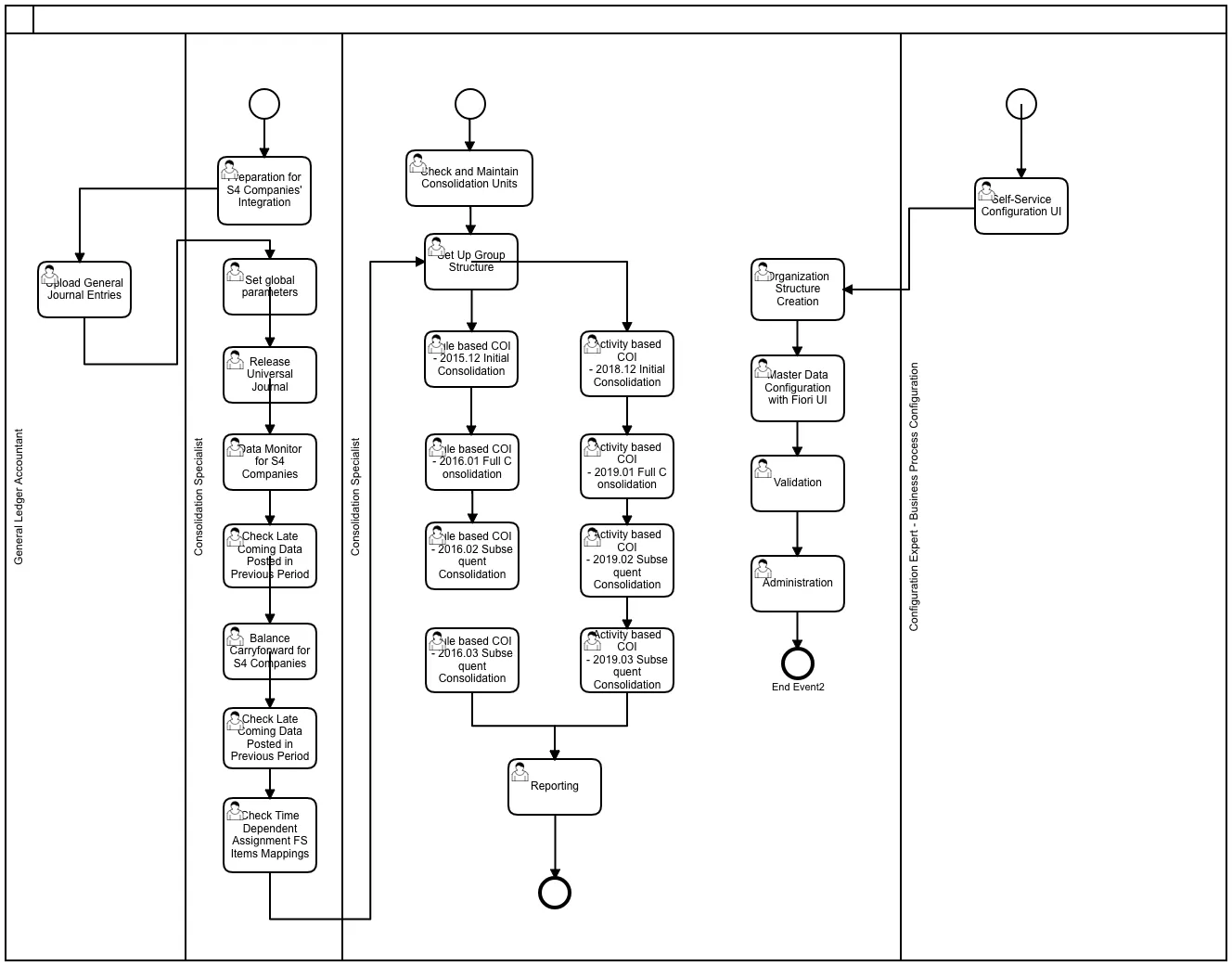
Year End Closing:
Section titled “Year End Closing:”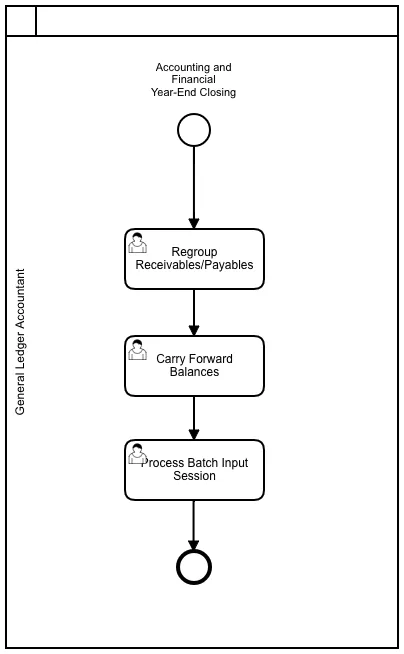
Period End Closing:
Section titled “Period End Closing:”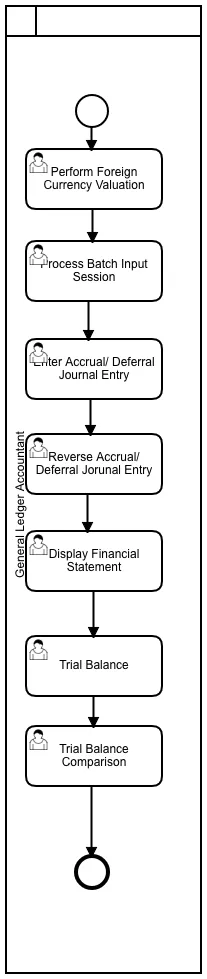
SAP Best Practices Receivables Account Structure:
Section titled “SAP Best Practices Receivables Account Structure:”Show extracted text
1/19/2021https://help.sap.com/http.svc/dynamicpdfcontentpreview?deliverable_id=23188577&topics=c6cf9701693c4e0e980cfe4f539d… 2/7012543000 - Receivables from Partners (no recon acct)G/L Account Number(I_SAKNR)12543000G/L Acct Long Text (SKAT) Receivables from Partners (no recon acct)G/L Account Group SAKOBalance/ P&L Account BalanceAccount Category Asset/Liability - ARAccount Purpose Receivables from Partners, relevant for foreign currency revaluationAccount Hierarchy Level ASSETS | CURRENT ASSETS | TRADE AND OTHER RECEIVABLES | Accounts participatorsUsed in Conguration or MasterDataXWhere Used in the GlobalAccount Determination orMaster DataAcct Determ. for Open Item Exch.Rate DifferencesAccount Usage In the documentation group for Accounts participators, the following accounts are described:G/L Account Number (I_SAKNR) G/L Acct Long Text (SKAT)12543000 Receivables from Partners (no reconacct)The Account Receivables application component records and administers accounting data of allcustomers. It is also an integral part of sales management.Features of the accounts receivable application component include the following:All postings in Accounts Receivable are also recorded directly in the General Ledger. DifferentG/L accounts are updated depending on the transaction involved (for example, receivables,down payments, and bills of exchange)The system contains a range of tools that you can use to monitor open items, such as accountanalysis, alarm reports, due date lists, and a exible dunning program.The correspondence linked to all these tools can be individually formulated to suit yourrequirements. This is also the case for payment notices, balance conrmations, accountstatements, and interest calculations.The payment program can automatically carry out direct debiting and down payments.Process Related Information In order to distinguish between other receivables and liabilities between shareholders and Ltd., aseparate clearing account should be established for each shareholder.Example GermanyIf the shareholder account accounts for a balance at the expense of the shareholder, he must payinterest on it because the tax office assumes that the Ltd. would not provide a third party with a creditfree of charge. Otherwise, shareholders risk a hidden prot.As a matter of fact, the tax authorities accept an interest rate of approximately 6% on shareholderaccounts. This interest rate is to be applied to the annual average value of the shareholder account.Posting Examples Posting of interest on shareholder accountThe shareholder account accounts for a claim of the Ltd. against its managing director for the entireyear.1/19/2021https://help.sap.com/http.svc/dynamicpdfcontentpreview?deliverable_id=23188577&topics=c6cf9701693c4e0e980cfe4f539d… 3/70The balance is EUR 20000 at the beginning of the nancial year, and EUR 12000 at the end of thenancial year. If this is the mean value, the managing director of the Ltd. owes an average of EUR 16000during the year. This amount is payable at 6%.The following posting occurs if interest rates are left as short-term receivables. However, you can alsopostpone the interest to the shareholder accountDebit Credit1254300 - Receivables from Partners (no reconacct) 960EUR70100000 - Interest Income 960EUR12400000 - Allowance for Doubtful ReceivablesG/L Account Number(I_SAKNR)12400000G/L Acct Long Text (SKAT) Allowance for Doubtful ReceivablesG/L Account Group ABSTBalance/ P&L Account BalanceAccount Category Reconcil. Acct.Account Purpose Reconciliation account for ARAccount Hierarchy Level ASSETS | CURRENT ASSETS | TRADE AND OTHER RECEIVABLES | Allowance for Doubtful ReceivablesUsed in Conguration or MasterDataXWhere Used in the GlobalAccount Determination orMaster DataReconciliation accounts for Year-Closing/Opening posting / Account Determ.for special G/L indicatorsAccount Usage In the documentation group for Allowance for Doubtful Receivables, the following accounts aredescribed:G/L Account Number (I_SAKNR) G/L Acct Long Text (SKAT)12400000 Allowance for Doubtful Receivables12401100 Allowance for DoubtfulReceivables(Valuation)The Account Receivables application component records and administers accounting data of allcustomers. It is also an integral part of sales management.Features of the accounts receivable application component include the following:All postings in Accounts Receivable are also recorded directly in the General Ledger. DifferentG/L accounts are updated depending on the transaction involved (for example, receivables,down payments, and bills of exchange)The system contains a range of tools that you can use to monitor open items, such as accountanalysis, alarm reports, due date lists, and a exible dunning program.The correspondence linked to all these tools can be individually formulated to suit yourrequirements. This is also the case for payment notices, balance conrmations, accountstatements, and interest calculations.The payment program can automatically carry out direct debiting and down payments.1/19/2021https://help.sap.com/http.svc/dynamicpdfcontentpreview?deliverable_id=23188577&topics=c6cf9701693c4e0e980cfe4f539d… 4/70The account is a reconciliation account.The Allowance for Doubtful Receivables Valuation Account is used as Allowance for bad debt used intcode F107 per IFRS 9.Process Related Information Doubtful Receivables are made if the incoming payment appears to be uncertain and is not onlyassociated with a latent default risk. Reasons for this can be:Payment delays by the customer,Customer refuses payment due to defects,Debtor has lodged an objection against dunning notice.If it is still not predictable on the balance sheet date to which extent the doubtful receivables havebecome unrecoverable, the loss of receivables must be estimated and amortized.For reasons of balance sheet clarity, it is advisable to separate the balance sheet into doubtfulreceivables and "normal" receivables before the balance sheet date. The account for doubtful accountsis an active asset account. The prot is not affected by this transfer alone.The depreciation for doubtful receivables does not automatically lead to the adjustment of the value-added tax. An adjustment of the value-added tax is only possible if the loss of receivables is certain.Posting Examples Company posts Doubtful ReceivablesAn entrepreneur has receivables in the amout of 59500 EUR (19% VAT). On the balance sheet date,these requirements were doubtful. The entrepreneur reckons with a maximum payment inow in theamout of 50%. The VAT can only be corrected if the payment actually fails. As of the balance sheetdate, he booked doubtful receivables.Debit Credit12400000 - Allowance for Doubtful Receivables25000EUR12100000 - Receivables Domestic 25000EUR12401100 - Allowance for Doubtful Receivables(Valuation)G/L Account Number(I_SAKNR)12401100G/L Acct Long Text (SKAT) Allowance for Doubtful Receivables(Valuation)G/L Account Group SAKOBalance/ P&L Account BalanceAccount Category Asset/Liability - APAccount Purpose Allowance for bad debt used in tcode F107 per IFRS 9Account Hierarchy Level ASSETS | CURRENT ASSETS | TRADE AND OTHER RECEIVABLES | Allowance for Doubtful ReceivablesUsed in Conguration or MasterDataXWhere Used in the GlobalAccount Determination orMaster DataAccount Determination for Balance Sheet Transfer PostingsAccount Usage In the documentation group for Allowance for Doubtful Receivables, the following accounts aredescribed:G/L Account Number (I_SAKNR) G/L Acct Long Text (SKAT)1/19/2021https://help.sap.com/http.svc/dynamicpdfcontentpreview?deliverable_id=23188577&topics=c6cf9701693c4e0e980cfe4f539d… 5/7012400000 Allowance for Doubtful Receivables12401100 Allowance for DoubtfulReceivables(Valuation)The Account Receivables application component records and administers accounting data of allcustomers. It is also anSAP Best Practices Payables Account Structure:
Section titled “SAP Best Practices Payables Account Structure:”Show extracted text
1/19/2021https://help.sap.com/http.svc/dynamicpdfcontentpreview?deliverable_id=23188577&topics=aecefc96a9294a48a36d40b548f8… 2/8021310000 - Accounts Payable - BoE PayableG/L Account Number(I_SAKNR)21310000G/L Acct Long Text (SKAT) Accounts Payable - BoE PayableG/L Account Group ABSTBalance/ P&L Account BalanceAccount Category Reconcil. Acct.Account Purpose Reconciliation account for AP - BoE F110Account Hierarchy Level LIABILITIES | CURRENT LIABILITIES | BILL OF EXCHANGE | Accounts Payable - BoE PayableUsed in Conguration or MasterDataXWhere Used in the GlobalAccount Determination orMaster DataAccount Determ.for special G/L indicatorsAccount Usage In the documentation group for Bill of Exchange, the following accounts are described:G/L Account Number(I_SAKNR)G/L Acct Long Text (SKAT)21310000 Accounts Payable - BoE PayableThe following topics explain how to post and process bills of exchange.Bills of Exchange: OverviewThe following types of bill of exchange can be managed in and posted to the AccountsReceivable:Bills of Exchange ReceivableBank Bills and Bills of Exchange Payment RequestsBills of Exchange PayableCheck/bill of exchange in Accounts Receivable (reverse bill of exchange)Check/bill of exchange in Accounts Payable (reverse bill of exchange)Bills of exchange are handled as special General Ledger transactions in the Cloud. Thesetransactions are thus maintained independently of other transactions in the subsidiary ledgerand are posted to a special G/L account in the general ledger. This affords you an overview ofbills of exchange receivables and bills of exchange payables at any stage. Transfer postings arenot usually necessary to display these items on the balance sheet.Bills of Exchange ReceivableBills of exchange are a form of short-term nance. If your customer pays by bill of exchange, hedoes not make payment immediately, but only once the period specied on the bill has elapsed(three months, for example). Bills of exchange can be passed onto third parties for renancing(bill of exchange usage).A bill of exchange can be discounted at a bank in advance of its due date (discounting) . Thebank buys the bill of exchange from you. Since the bank does not receive the amount until thedate recorded on the bill, it charges you interest (discount) to cover the period betweenreceiving the bill of exchange and its actual payment. Some form of handling charge is alsousually levied.1/19/2021https://help.sap.com/http.svc/dynamicpdfcontentpreview?deliverable_id=23188577&topics=aecefc96a9294a48a36d40b548f8… 3/80If you do not use the bill for renancing in this way, you can either present it to your customerfor payment on the due date, or deposit it at a bank shortly before the due date for collection.The bank charges you a collection fee for this service.In some countries, you can also pass on a bill of exchange to a third party as a means ofpayment. You may pass it onto a vendor, for example, to clear your own payables (means ofpayment).You can also sell your bills of exchange receivables abroad (forfeiting). When you use the bill inthis way (otherwise known as non-recourse nancing of receivables) you are freed, from anyliability to recourse.When you deposit a bill of exchange receivable at a bank, you can make use of the following twofunctions offered by the system:You can create a bill of exchange presentation list for your bank. If required, the system poststhis bill of exchange usage automatically. This procedure applies to bills of exchange not yetdue, for example in Italy.You can present the bill of exchange at your bank and post the bill of exchange usage manually.In the general ledger, the bill liability is managed in separate G/L accounts that offset the entryin the bank account.Once the due date has been reached and the country/region-specic protest period haselapsed, you reverse the bill liability. You are no longer subject to any liability to recourse. Theprotest period enables the last holder of a bill to make use of his or her right of recoursewhereby he or she demands that one of the parties recorded on the bill of exchange makepayment of the amount. The protest is an official record that the drawee has not paid the bill ofexchange.By accepting a bill of exchange you incur costs which the customer pays if the bill is due laterthan the invoice. When you post a bill of exchange payment, you therefore levy bill of exchangecharges on your customer. These can include interest charges (discount), and collection fees.You can enter the bill of exchange charges when you post the bill or you can have the systemcalculate them automatically. Any combination of the above-mentioned bill of exchange chargesis possible. The charges are levied on the customer automatically. Generally, bill of exchangecharges are due net immediately. If you require special terms of payment for the charges, thesecan be dened in the customer master record.In some countries, you must record bills of exchange receivable in a bill of exchange list. The billof exchange list is a subsidiary ledger and contains all the essential data of incoming bill ofexchange receivables. The day of expiration of the bill of exchange and the address data of theissuer are included in this list.In the system, you can distinguish between rediscountable and non-rediscountable bills ofexchange. Rediscountable bills of exchange must meet country/region-specic conditions thatallow a commercial bank to pass on the bill of exchange for rediscounting to the State CentralBank. In Germany for example, the following conditions exist:Three authorized signatures on the bill of exchange.Remaining life may not exceed three months.Bill of exchange must be payable at a State Central Bank city. This is a city in which theState Central Bank has an office.Commercial banks cannot pass on non-rediscountable bills of exchange to the StateCentral Bank for rediscounting. By distinguishing between these two types of billsduring entry, you can have the system display them separately in the balance sheet. Thespecial G/L indicator indicates the type of bill of exchange entered. The bills ofexchange are posted to different special G/L accounts. When a change to the status of abill of exchange occurs, transfer postings are necessary before preparation of thebalance sheet. For example, a non-rediscountable bill of exchange becomesrediscountable if its remaining life has changed.1/19/2021https://help.sap.com/http.svc/dynamicpdfcontentpreview?deliverable_id=23188577&topics=aecefc96a9294a48a36d40b548f8… 4/80If such a distinction is not required in your country or region, you will post all bills ofexchange receivable using the same special G/L indicator.Bank Bills and Bills of Exchange Payment RequestsBank bills and bill of exchange payment requests are special bills of exchange receivables thatare not issued by the customer but by you. Bill of exchange payment requests are sent to thecustomer for acceptance, and bank bills are passed directly on to a bank for nancing. Bankbills are subject to a general agreement with the customer whereby the customer’s acceptanceis not required. Both payment procedures are common in Italy, France, and Spain.Bill of Exchange ListIn some countries, all bill of exchange receivables must be listed. The bill of exchange list is asubsidiary ledger and contains all essential data of incoming bills of exchange receivable. Theday of expiration of the bill of exchange and the address data of the issuer are included in thislist. The reports for creating the bill of exchange list can be found in the Accounts Receivableand Accounts Payable menus under the menu option Periodic processing.Bills of Exchange PayableYou will normally use the payment program to post bills of exchange payable. All subsequentpostings, such as the payment of a bill of exchange by the bank and the cancellation of the billMatching Principle:
Section titled “Matching Principle:”Revenue and COGS should be posted in the same period as per Matching Principle in Accounting. SAP standard set up is to post COGS at Goods Issue but this can be configured per business requirement. If your business process includes Goods Issue without Billing in one period then change SAP setup to post COGS at Billing instead of at Goods Issue.
Steps to Post COGS at Billing:
Section titled “Steps to Post COGS at Billing:”- Transaction OBYC > GBB > VAX > Goods in transit account:
Switch the COGS account with a Goods in Transit Account, the goods issue entry will change to below

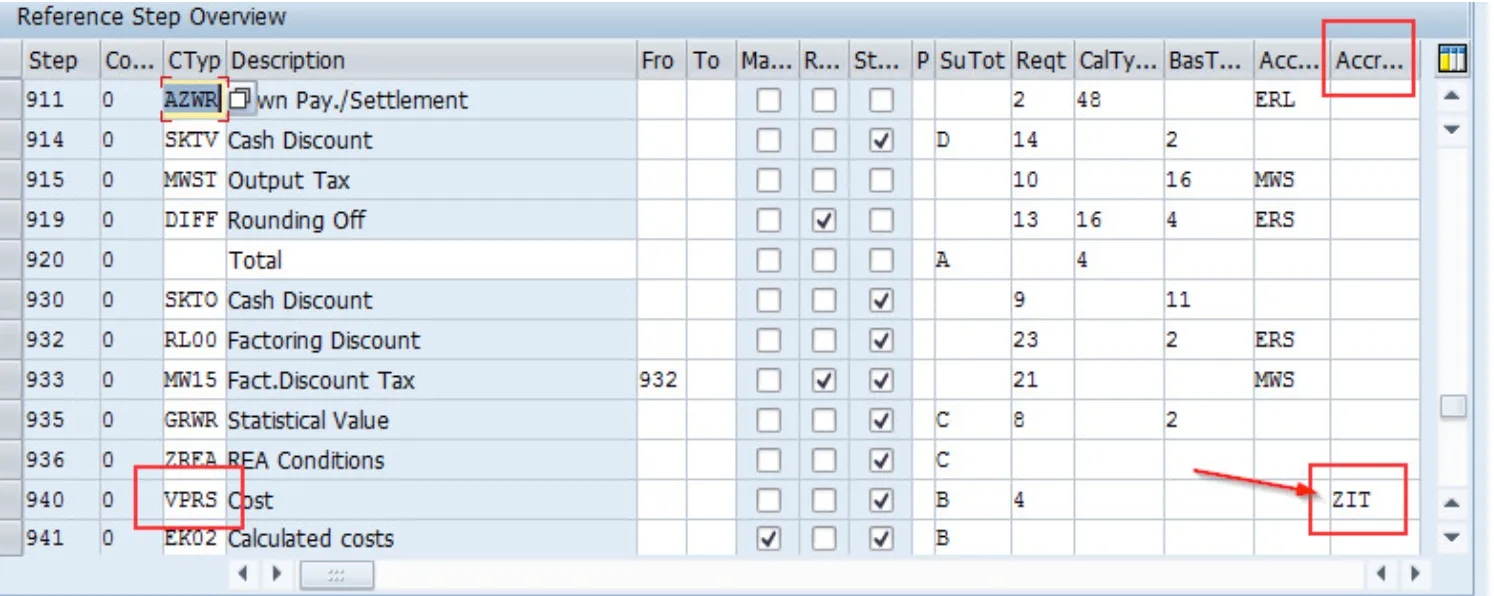
- Transaction V/08 > Pricing Procedure > VPRS > Accrual Account Key:
Maintain a new account key and assign to VPRS:
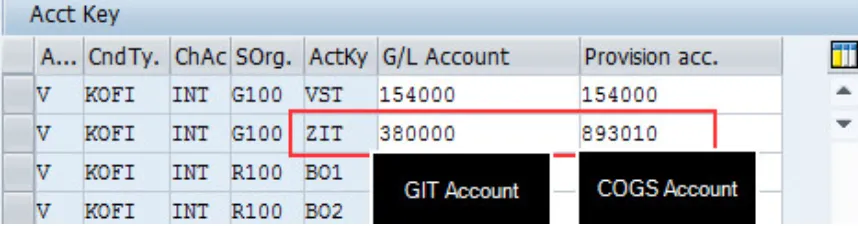
- Transaction VKOA > Assign GL Accounts to the new Account Key:
Assign COGS account in the provision column and Goods in Transit in GL column:
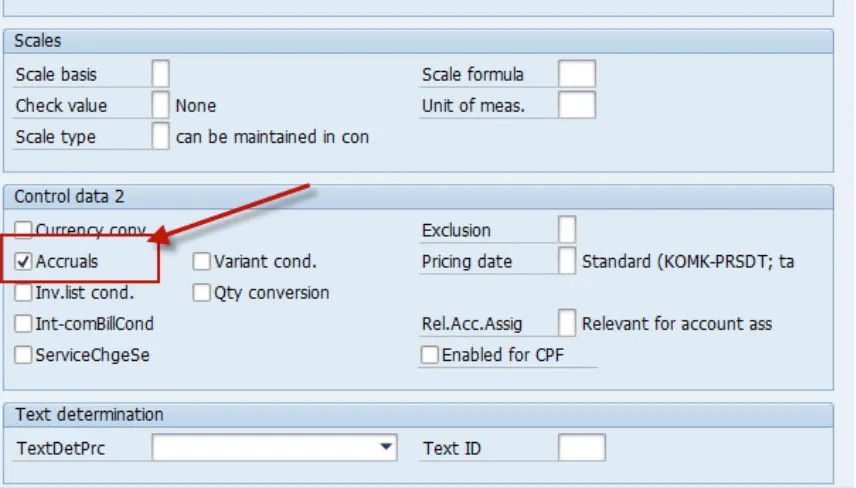
- Change VPRS condition to accept accruals:
This tells SAP to post the VPRS value to the 2 accounts maintained in VKOA:
- Billing Document Posted as below:

Tables:
Section titled “Tables:”Universal Journal
Section titled “Universal Journal”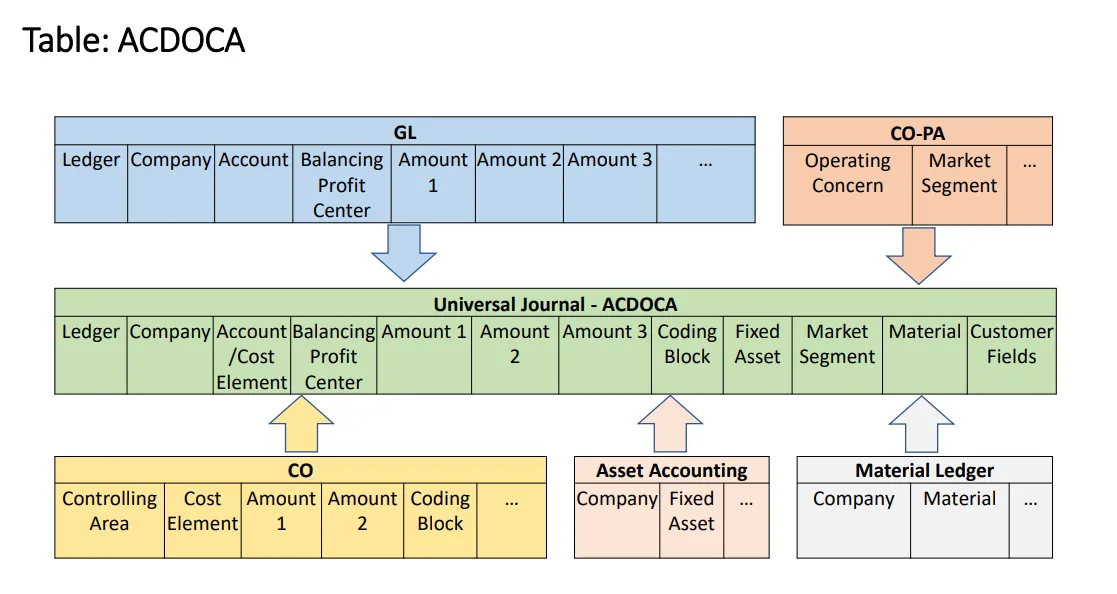
Extensibility (Coding Block & COPA)
Section titled “Extensibility (Coding Block & COPA)”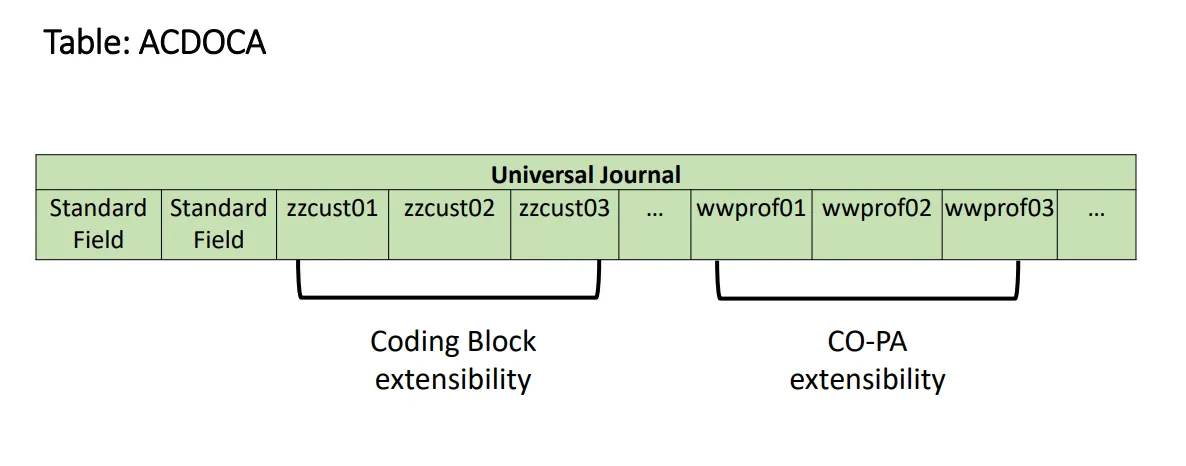
List of tables
Section titled “List of tables”| Table | Name | S/4HANA - Notes |
|---|---|---|
| SKA1 | G/L Account Master (Chart of Accounts) | GLACCOUNT_TYPE for Cost Element Definition. Logical Database BRF GLU3 SDF. |
| SKAT | G/L Account Master Record (Chart of Accounts: Description) | |
| SKB1 | G/L account master (company code) | In Logical Database BRF GLU3 SDF. |
| BKPF | Accounting Document Header | In Logical Database BMM BRF BRM DDF KDF SDF. |
| BSEG | Accounting Document Segment | In Logical Database BMM BRF BRM DDF KDF SDF. |
| VBKPF | Document Header for Document Parking | |
| BSEG_ADD | Entry View of Accounting Document | When the document is not relevant for the leading ledger. |
| FAGLFLEXA | General Ledger: Items | |
| FAGLFLEXP | General Ledger: Plan Line Items | |
| FAGLFLEXT | General Ledger: Totals | |
| ACDOCA | Universal Journal Entry Line Items | |
| ACDOCC | Consolidation Journal | |
| ACDOCP | Plan Data Line Items | |
| T007A | Tax Keys | |
| T007B | Tax Processing in Accounting | |
| T007S | Tax Code Names | |
| T030K | Tax Accounts Determination | |
| T059A | Type of Recipient For Vendors | |
| T059B | Withholding Tax Classes for Vendors: Names | |
| T059C | Types of Recipient: Vendors per Withholding Tax Type | |
| T059E | Income Types | |
| T059F | Formulas for Calculating Withholding Tax | |
| T059G | Income Types: Names | |
| T059K | Withholding tax code and processing key | |
| T059P | Withholding tax types | |
| T059Z | Withholding tax code (enhanced functions) | |
| T001B | Permitted Posting Periods | |
| FAGL_SEGM | Master Data for Segments | |
| FM01 | Financial Management Areas | |
| T001 | Company Codes | |
| T014 | Credit control areas | |
| T880 | Global Company Data (for KONS Ledger) | |
| TFKB | Functional areas | |
| TGSB | Business Areas | |
| TGSBK | Consolidation business areas | |
| TKA02 | Controlling area assignment | Assigment Company Code to Controlling area. |
| NRIV | Number Range Intervals | Edit with transaction SNUM. Object=RF_Beleg for FI-documents. |
| T003 | Document Types | |
| KNA1 | General Data in Customer Master | In Logical Database BRF DDF SD_KUSTA VC1 VC2 VDF WTY. |
| KNB1 | Customer Master (Company Code) | In Logical Database BRF DDF VDF. |
| KNB4 | Customer Payment History | In Logical Database BRF DDF. |
| KNB5 | Customer master (dunning data) | In Logical Database BRF DDF. |
| KNBK | Customer Master (Bank Details) | In Logical Database BRF DDF. |
| TIBAN | IBAN | In Logical Database IBAN. |
| BUT000 | Business Partner: General data I | In Logical Database REBP UKM_BUPA. |
| BUT020 | Business Partner: Addresses | In Logical Database REBP. |
| BUT0BK | BP: Bank Details | |
| BUT100 | Business Partner: Roles | In Logical Database REBP. |
| CVI_CUST_LINK | Assignment Between Customer and Business Partner | |
| BSAD | Accounting: Secondary Index for Customers (Cleared Items) | |
| BSEC | One-Time Account Data Document Segment | In Logical Database BRM. |
| BSID | Accounting: Secondary Index for Customers | For open items migration Accounts Receivable. In Logical Database DDF VDF. |
| REGUH | Settlement data from payment program | In Logical Database PYF. |
| REGUP | Processed items from payment program | In Logical Database PYF. |
| VBSEGD | Document Segment for Customer Document Parking | |
| FAGL_SPLINFO | Splittling Information of Open Items | |
| NRIV | Number Range Intervals | Edit with transaction SNUM. |
| LFA1 | Vendor Master (General Section) | In Logical Database BRF KDF WTY. |
| LFB1 | Vendor Master (Company Code) | In Logical Database BRF KDF. |
| LFBK | Vendor Master (Bank Details) | In Logical Database BRF KDF. |
| LFM1 | Vendor master record purchasing organization data | |
| CVI_VEND_LINK | Assignment Between Vendor and Business Partner | |
| BSAK | Accounting: Secondary Index for Vendors (Cleared Items) | |
| BSIK | Accounting: Secondary Index for Vendors | For open items migration Account Payable. In Logical Database KDF. |
| BSIP | Index for Vendor Validation of Double Documents | |
| FPAYHX | Payment Medium: Prepared Data for Payment | |
| REGUV | Control records for the payment program | |
| VBSEC | Document Parking One-Time Data Document Segment | |
| VBSEGK | Document Segment for Vendor Document Parking | |
| VBSEGS | Document Segment for Document Parking - G/L Account Database | |
| VBSET | Document Segment for Taxes Document Parking | |
| T052 | Terms of Payment | |
| ----------------- | -------------- |
Transactions:
Section titled “Transactions:”| ECC Tr. | S4 Tr. | Description |
|---|---|---|
| FS01 | FS00 | Create G/L Accounts |
| FS02 | FS00 | Change G/L Accounts |
| FS03 | FS00 | Display G/L Accounts |
| KA01 | FS00 | Create Primary Cost Element |
| KA02 | FS00 | Change Cost Element |
| KA03 | FS00 | Display Cost Element |
| KA06 | FS00 | Create Secondary Cost Element |
| F.24 | FINT | A/R: Interest for Days Overdue |
| F.2A | FINT | A/R Overdue Int.: Post (Without OI) |
| F.2B | FINT | A/R Overdue Int.: Post (with OI) |
| F.2C | FINT | Calc.cust.int.on arr.: w/o postings |
| F.4A | FINTAP | Calc.vend.int.on arr.: Post (w/o OI) |
| F.4B | FINTIAP | Calc.vend.int.on arr.: Post(with OI) |
| F.4C | FINTAP | Calc.vend.int.on arr.: w/o postings |
| FA39 | obsolete | |
| F.47 | FINTAP | Vendors: calc.of interest on arrears |
| S_PL0_86000030 | FIS_FPM_GRID_GLACC_B AL | G/L Account Balances |
| S_PCO_36000218 | FCOM_FIS_AR_OVP | Receivables Segment |
| S_PCO_36000219 | FCOM_FIS_AP_OVP | Payables Segment |
| S_ALR_87012326 | FCOM_FIS_GLACCOUNT_O VP | Chart of Accounts |
| S_AC0_52000887 | Receivables: Profit Center | Receivables Profit Center |
| S_AC0_52000888 | Payables: Profit Center | Payables Profit center |
| S_ALR_87100992 | Account Assignment Manual | |
| F.16 | FAGLGVTR | Balance Carry Forward |
| F04N/ F.05 | FAGL_FCV | Foreign Currency valuation |
| F101 | FAGLF101 | Regrouping |
| F.01 | FAGLF03 | Comparison: Documents/ transaction figues |
| FS10N | FAGLB03 | G/L account balances display |
| FBL3N | FAGLL03H/FBL3H | Line item display G/L |
| FBL1N | FBL1H | Vendor line items (FBL1N & FBL1H is optional) |
| FBL5N | FBL5H | Customer line items (FBL5N & FBL5H is optional) |
| N/A | FAGLCOFIFLUP | Transfer CO documents from worklist to FI (Realtime – integration) |
| N/A | FGI3 | Financial Statement |
| ----- | ------ | --------------------- |
Programs, Function Modules and Exits:
Section titled “Programs, Function Modules and Exits:”| Programs | Description | Type |
|---|---|---|
| RFBILA00 | Financial Statements | GL |
| RFBILA00 | Financial Statements | GL |
| SAPF100 | Foreign Currency Valuation | GL |
| RFUSVS14 | Annual Operations Report | GL |
| RFITEMGL | G/L Account Line Item Display | GL |
| RFITEMAP | Vendor Line Item Display | GL |
| RFITEMAR | Customer Line Item Display | GL |
| RFPOSXEXTEND | Correction: Change/Activate RFPOSXEXT | GL |
| RFWT0020 | Recreate and Change Withholding Tax Data with Witholding TaxRate of 0% | GL |
| RFBISA00 | Interface for General Ledger Account Master Data | GL |
| RFDOPR10 | Customer Open Item Analysis by Balance of Overdue Items | GL |
| RFUMSV25 | Deferred Tax Transfer | GL |
| SAPMFCJ0 | SAPMFCJ0: Cash Journal | GL |
| RFBNUM00 | Gaps in Document Number Assignment | GL |
| RFGSTAUS | Perform for the GST Calculation Sheet (F_RFUVAU___01) | GL |
| RFEBCK00 | Cashed Checks | GL |
| RFCASH00 | Cash Journal | GL |
| RGGBS000 | Exit Routines for Substitutions | FI |
| SAPMGCU0 | Module Pool for FI-SL Customizing | FI |
| RGUGBR00 | Generates ABAP Coding for Validations/Substitutions/Rules | FI |
| RGGBR000 | Exit Routines for Rules | FI |
| SAPMGSBM | Module Pool for Set Maintenance | FI |
| SAPMGSGM | Maintain Variables | FI |
| RGZZGLUX | FI-SL XPRA: Generation GLU1, GLU2, FI-SL Programs | FI |
| RGUREC10 | Transfer Documents from Financial Accounting | FI |
| RGURECGLFLEX | Transfer of Opening Balance Actual Data to General Ledger | FI |
| SAPMGTRA | Transport of Customizing Objects | FI |
| SAPFGVTR | Balance carryforward | FI |
| RGUREC00 | Example of External Data Transfer into FI-SL | FI |
| RGIMOVV0 | FI-SL: Generate Variable Field Movements | FI |
| SAPMGRWJ | SAP Report Writer: Processing of Object Type ‘Report Group’ | FI |
| SAPMF02C | Credit Management Master Data | AR |
| SAPF150D2 | FI Dunning Print Program | AR |
| SAPMFKM0 | Configuration Menu: Call Transactions and Dialog Modules | AR |
| SAPF150D | Dunning Notice Print (With Update of Line Items and Master Records) | AR |
| RF150SMS | Program RF150SMS | AR |
| RFDRRANZ | Accounts Receivable Information System | AR |
| SAPF150V | Module Pool for the Dunning Program (Parameter Maintenance and Run) | AR |
| RFDUZI00 | Calculate Interest on Arrears | AR |
| SAPMFKD0 | Dunning Procedure Customizing | AR |
| RFCORR14 | Resetting of Dunning Run via MHNK/MHND | AR |
| SAPMFBWE | Bill of Exchange Presentation | AR |
| RFDRRE05 | Due Date Analysis Create Evaluations (Subroutine Pool) | AR |
| RFDKLI41 | Credit Master Sheet | AR |
| RFDKLI40 | Credit Overview | AR |
| SAPMF02K | Vendor Master Data | AP |
| RFFOUS_C | International Payment Medium Check (with check management) | AP |
| RFFOUS_T | Payment Medium USA Transfers/Bank Direct Debits in ACH Format | AP |
| RFFOEDI1 | International Payment Medium Payment Orders by EDI | AP |
| RFFOAVIS_FPAYM | Payment Medium Correspondence for Generic Payment Medium Program | AP |
| RFWT0010 | Adjustment of Withholding Tax Information to Relevant Types | AP |
| SAPF110S | Payment Program | AP |
| RFFOCH_P | Payment Medium Switzerland Postal Giro/SAD/BAD | AP |
| RFFOM100 | International Payment Medium SWIFT Format MT100 | AP |
| RFZALI20 | Payment List | AP |
| RFFOCH_U | Payment Medium Switzerland Transfers, Bank Collection / DME | AP |
| SAPMFCHK | Check management module pool | AP |
| RFFOAVIS | Payment Medium International Zero Balance Notice | AP |
| RFW1099M | USA: Withholding Tax Report for 1099-MISC | AP |
| RFFOGB_T | Payment Medium Great Britain and Ireland BACWAY, BACSBOX, EFTS, EMTS | AP |
| RFFOD__L | Payment Medium Germany - Pmts in Ger.For.Tr.Regs (Z1 Form)/Foreign DME | PMW |
| RFFOD__S | International Payment Medium - Check (without check management) | PMW |
| RFFOUS_T | Payment Medium USA - Transfers/Bank Direct Debits in ACH Format | PMW |
| RFFOM200 | International Payment Medium - SWIFT Format MT200 | PMW |
| RFFOM202 | International Payment Medium - SWIFT Format MT202 | PMW |
| RFFOM210 | International Payment Medium - SWIFT Format MT210 | PMW |
| ----------------- | -------------- | -------------- |
Platforms:
Section titled “Platforms:”| ECC | S/4 HANA | U/X | Database |
|---|---|---|---|
| SAP ERP | SAP S/4 HANA | SAP FIORI | SAP HANA |
| -------------- | -------------- | --------------- | --------------- |
Note: S/4 (cloud & on-premise) works only on Hana DB while SAP ERP is compatible with Hana DB, MS Sql, Oracle DB, IBM DB2 etc.
Finance S4 - 1909 Doc:
Section titled “Finance S4 - 1909 Doc:”Show extracted text
PUBLICMichel Haesendonckx, SAP SESeptember 2019Finance in SAP S/4HANA 19092PUBLIC© 2019 SAP SE or an SAP affiliate company. All rights reserved. ǀThe information in this presentation is confidential and proprietary to SAP and may not be disclosed without the permission of SAP.Except for your obligation to protect confidential information, this presentation is not subject to your license agreement orany other serviceor subscription agreement with SAP. SAP has no obligation to pursue any course of business outlined in this presentation or any relateddocument, or to develop or release any functionality mentioned therein.This presentation, or any related document and SAP's strategy and possible future developments, products and or platforms directions andfunctionality are all subject to change and may be changed by SAP at any time for any reason without notice. The information in thispresentation is not a commitment, promise or legal obligation to deliver any material, code or functionality. This presentation is providedwithout a warranty of any kind, either express or implied, including but not limited to, the implied warranties of merchantability, fitness for aparticular purpose, or non-infringement. This presentation is for informational purposes and may not be incorporated into a contract. SAPassumes no responsibility for errors or omissions in this presentation, except if such damages were caused by SAP’s intentional or grossnegligence.All forward-looking statements are subject to various risks and uncertainties that could cause actual results to differ materially fromexpectations. Readers are cautioned not to place undue reliance on these forward-looking statements, which speak only as of their dates,and they should not be relied upon in making purchasing decisions.Disclaimer3PUBLIC© 2019 SAP SE or an SAP affiliate company. All rights reserved. ǀSAP S/4HANA Customer Story FlipbookIncluding Finance Transformation examplesSAP S/4HANA Customer Story Flipbook4PUBLIC© 2019 SAP SE or an SAP affiliate company. All rights reserved. ǀExamples:Superior Steering with Intelligent Accounting and FinancialClose (Christoph Ernst 13 min)Automating Closing and Consolidation (Elizabeth Milne 14 min)Start your Finance Transformation with Central Finance (DavidOrmerod 15 min)Machine Learning in Finance (Sebastian Schroetel 17 min)Predictive Accounting (Michel Haesendonckx 10 min)Margin Analysis (Michel Haesendonckx 19 min)… and far more (customer testimonials, panels, whitepapers,…)Finance topics on YouTubeand on the Virtual Finance Summit platformFinance SAP S/4HANA 1809 “What’s new” information(also accessible via blog here):Finance 1809 Overview (Michel Haesendonckx)https://youtu.be/CzPhDejuft8Margin Analysis (Michel Haesendonckx)https://youtu.be/TfbthMsYcrcPredictive Accounting (Michel Haesendonckx)https://youtu.be/yH-HJWeDyXAEmbedded Analytics (Michel Haesendonckx)https://youtu.be/wpakxWVEQv8Accruals Management (Christoph Ernst)https://youtu.be/wEru-hqfj1wGoods and Invoice Receipt Reconciliation (Christoph Ernst)https://youtu.be/jJXqWF1wJkwGroup Reporting (Christoph Ernst)https://youtu.be/mwn3O1rxd0ITax Service (Stefanie Schuetz-Tschiersky)https://youtu.be/EEhIAJfQjXMTreasury (Christian Mnich)https://www.youtube.com/watch?v=cGQuSpdaBS8SAP Finance playlist on YouTube:https://www.youtube.com/playlist?list=PL3ZRUb1AKkpTQscw2i-DjiEv0C-PTQINdSAP Offering for Record-to-Report and FP&A in SAPS/4HANA (Michel Haesendonckx) on YouTube:Why move to SAP S/4HANA for Accounting and FP&A: Anextensive process viewE2E view on financials – Enabling group-wide steering(Michel Haesendonckx) on YouTube:https://www.youtube.com/watch?v=_tZTVdOzRdsVideo Overview 1909 What’s New Videos 1809 What’s New VideosVirtual Summit (link)SAP S/4HANA 1909 - Finance “What’s new” information(also accessible via blog on sap.com/finance ):1909 - Highlights for Finance and Risk (Benno Eberle)https://youtu.be/Jc7_sZHDESQ1909 – SAP Contract and Lease Management (Tom Anderson)https://youtu.be/280GPAHPz-E1909 – SAP Receivables Management (Nicole Baranov)https://youtu.be/I5KWi7PxBMI1909 – SAP Treasury Management (Arif Esa)https://youtu.be/NyJKmaaVNRU1909 – Orchestrating an Accelerated Financial Close(Katharina Reichert) https://youtu.be/Kw_nZ_BLADY1909 – SAP S/4HANA for Group Reporting (Philip Aliband)https://youtu.be/3M7a1lsMrL8(All Michel Haesendonckx:)1909 - Driver-based Planning with SAP S/4HANA and SAPAnalytics Cloud - https://youtu.be/hYCCIX6SN4U )1909 - Margin Analysis with SAP S/4HANA Cloud and OnPremise - https://youtu.be/f6IAs5EUiP01909 - Universal Allocation in SAP S/4HANAhttps://youtu.be/XvxIrzSRxck1909 - Embedded Analytics - Integrating S/4HANA and SAC -https://youtu.be/PP4MERLl69w5PUBLIC© 2019 SAP SE or an SAP affiliate company. All rights reserved. ǀTHE pricing guide for Accounting and Closing can be retrieved from:https://jam4.sapjam.com/groups/RPadq9Uyvh8E1ChNAx59ry/documents/nWumpB3LMB1XorPf9J3vwn/slide_viewer?_lightbox=trueLatest version of this slide deck can be retrieved from:https://jam4.sapjam.com/groups/RPadq9Uyvh8E1ChNAx59ry/documents/jbvqL8bPIYEhBz4euQ7Fx7/slide_viewer?_lightbox=trueINTERNAL – Pricing guide and latest version of slide deck6PUBLIC© 2019 SAP SE or an SAP affiliate company. All rights reserved. ǀSAP S/4HANA – Accounting at the Heart of Every EnterpriseTransform from executing daily operations to drive growth and new business modelsMargin Analysis Simulate & OptimizeManagementAccountingFinancial CloseRecord Financial ReportingFinancialAccountingFP&AFinancial Planning& AnalysisR2RRecord-to-ReportPlan & Predicthttps://www.youtube.com/watch?v=mWmiAsY8y4wPlan & Prepare Accounting Close Report & Steer7PUBLIC© 2019 SAP SE or an SAP affiliate company. All rights reserved. ǀ SAP S/4HANA CentralFinance:• Accounting View onLogistics Information(AVL)• Indirect taxreporting Accruals management SAP S/4HANA for goodsand invoice receiptreconciliation Time-dependent Tax T-Account Display SAP Account Reconciliationand Automationby Blackline SAP S/4HANA Cloud forAdvanced FinancialClosing SAP S/4HANA for GroupReporting SAP IntercompanyFinancial Hubby Blackline SAP Intelligent RoboticProcess Automation SAP Revenue Accountingand Reporting (IFRS 15) SAP S/4HANA Cloud forContract & LeaseManagement (IFRS 16)R2RRecord-to-ReportFinancial CloseRecord Financial ReportingFinancialAccountingPlan & Prepare Accounting Close Report & SteerSAP S/4HANA Record-to-ReportWhat’s new in S/4HANA Finance 1909NewEnhancedEnhancedNewNewEnhancedEnhancedEnhancedNewEnhancedNewTopic specific videoavailable on YouTube(see resources overview)8PUBLIC© 2019 SAP SE or an SAP affiliate company. All rights reserved. ǀMargin AnalysisPlan & Predict Simulate & OptimizeManagementAccounting Financial planning content,integrated with SAP AnalyticsCloud for Planning Predictive accounting Universal Allocation Where used list Real Spend Margin Analysis Financial StatementInsights SAP Analytics Cloud andembedded reporting Customer ProfitabilityAnalyticsFP&AFinancial Planning& AnalysisPlan & Prepare Accounting Close Report & SteerSAP S/4HANA Financial Planning & AnalysisWhat’s new in S/4HANA Finance 1909NewIntegratedEnhancedEnhancedNewEnhancedEnhancedEnhancedNewTopic specific videoavailable on YouTube(see resources overview)9PUBLIC© 2019 SAP SE or an SAP affiliate company. All rights reserved. ǀoverviewArea Key Topic/Enhancements to be planned with 1909 On premise SeparateLicenseR2R Record Central Finance: Indirect Tax Reporting 1809, FPS02 x (CF + ACR)Financial Accounting Accruals Management: ML-Service 1909 x (only ML-service)Goods and Invoice Receipt Reconciliation: ML-Service + Enhancements 1909 xTime-dependent tax code Tbd. (not 1909)T-Account Display 1909SAP Account Reconciliation and Autom