
SAP SD Module
DOCS related to SAP Selling & DistributionProcess Modeling:
Section titled “Process Modeling:”Order to cash process overview:
Section titled “Order to cash process overview:”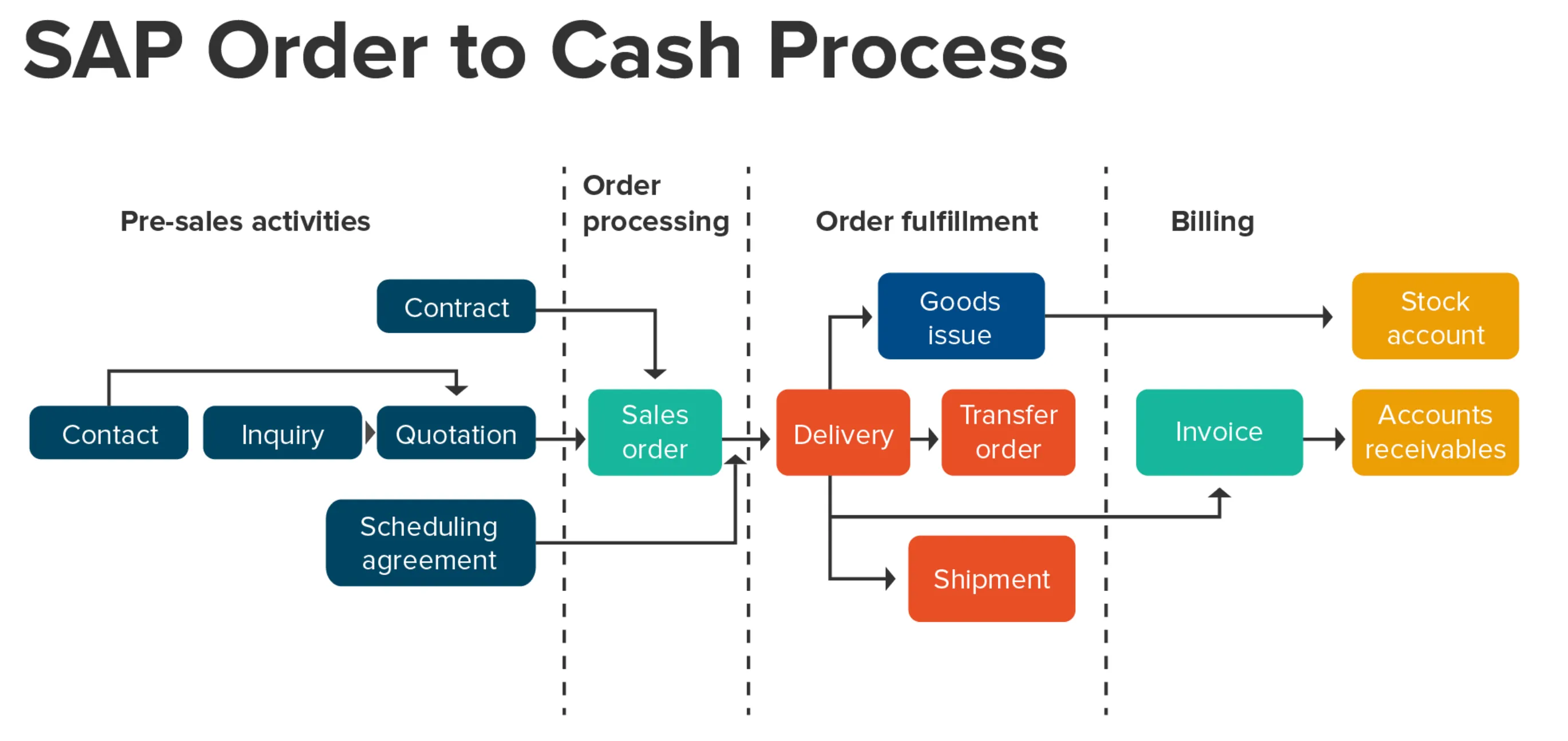
Selling & Distribution process overview:
Section titled “Selling & Distribution process overview:”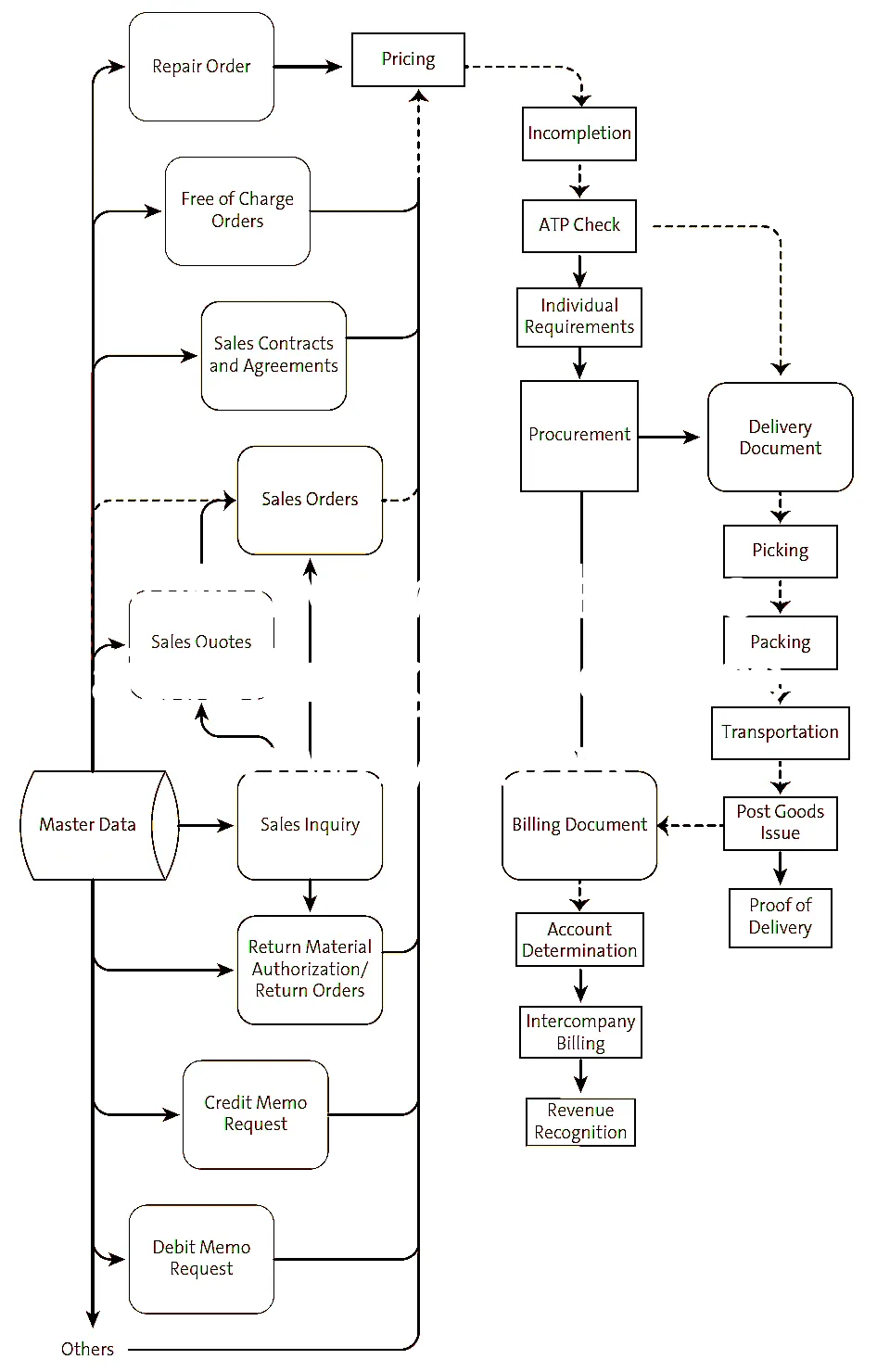
SD Variant Configuration:
Section titled “SD Variant Configuration:”- Create Characteristics (CT04)
- Create Class (CL01)
- Assign Class to Material Master (CL20N)
- Assign Class to Bill of Material (CS01/CS02)
- Create Configuration Profile for FERT (Root Code Item) (CU41)
- Create Configuration Profile for KMAT (Configurable Item) (CU41)
- Create Dependency
- Dependency types
- Precondition:
- Action:
- Selection Condition:
- Procedure
- Create Table Structure (CU61)
- Maintain Table Contents (CU60)
- Create Configurable Material Master (MM01)
Variant Configuration Guide:
Section titled “Variant Configuration Guide:”Show extracted text
1SAPVARIANT CONFIGURATIONSajiv FrancisJanuary 20212Variant Configuration User ManualContents1. Create Characteristics (CT04).................................................................................................................22. Create Class (CL01) .................................................................................................................................63. Assign Class to Material Master (CL20N) ...............................................................................................84. Assign Class to Bill of Material (CS01/CS02) ....................................................................................... 105. Create Configuration Profile for FERT (Root Code Item) (CU41) ........................................................ 116. Create Configuration Profile for KMAT (Configurable Item) (CU41) .................................................. 147. Create Dependency............................................................................................................................. 198. Dependency types .............................................................................................................................. 211. Precondition: ................................................................................................................................... 212. Action: ............................................................................................................................................. 213. Selection Condition: ........................................................................................................................ 224. Procedure ........................................................................................................................................ 229. Create Table Structure (CU61) ............................................................................................................ 2410. Maintain Table Contents (CU60)..................................................................................................... 2711. Create Configurable Material Master (MM01) ............................................................................... 2831. Enter the CharacteristicName2. Press (Create)1. Enter Characteristic Description,Characteristic Group and Statusas “Released”2. Maintain Data type as“Character Format” or “Numericformat”3. Maintain Number of Characters4. Select the Value assignmenteither single value or multiplevalue5. Go to view “Values”1. Create Characteristics (CT04)(Logistics Central Functions Variant C o n f igu r a tion E n v i r o nme n t C l a s s i fic a t i o n MasterData CT04 – Characteristics)41. Select the Characteristic valueand go to “Extras Objectdependencies Editor” toassign dependencies1. Maintain the all possibleCharacteristic values51. Write the Source code for Dependency2. Press (Check Consistency)3. Press (Save) to save the dependency1. Select the Dependency type. ExPrecondition2. Press Enter61. Maintain Valid Class Types i.e.200(Material Configurable Objects) and300 (Variants)2. Save the Characteristic1. Maintain Dependency for the requiredcharacteriztic Values2. Go to view “Restrictions”71. Enter the Class Name and Class Type as300 (Variant)2. Press (Create)1. Enter Class Description2. Maintain the Status “Released”3. Go to View “Char”2. Create Class (CL01)(Logistics Central Functions Variant C o n f igu r a tion E n v i r o nme n t C l a s s i fic a t i o n MasterData CL02 ‐ Classes)81. Make a tick mark for “Allowed inBOMs2. Enter Base unit of Measure and Res.Item category3. Press (Save)1. Enter/Assign all requiredcharacteriztics to the Class2. Go to View “Addnl Data”91.2.3.Enter Material code to which class isto be assignedEnter Class type as 300Press (Enter)1. Select the Class using F4 Help2. Press (Enter)3. Assign Class to Material Master (CL20N)(Logistics Central Functions Variant Configuration Environment Classification ClassificationCL20N ‐ Assign Object to Classes)101. Choose the Characteristic values that arerequired as “Default” (Whilemaintaining configuration data thesevalues will appear default)2. Press (Save)111. Enter Material Code, Plant and BOMUsage2. Press (Enter)1. Select the Item Category as “K(Class Item”2. Enter Resulting Item Category as “L(StockItem)”3. Select Class Type 300 (Variant)4. Enter the Class and quantity5. Press (Save) the BOM4. Assign Class to Bill of Material (CS01/CS02)(Logistics Production Master Data Bills of Material Bill of Mat e rial Mat e r i al BOM C S 0 1– Create/CS02 – Change)121. Select Configurable Object “Material”2. Press (Enter)1. Enter Material Code2. Press (Enter)5. Create Configuration Profile for FERT (Root Code Item) (CU41)(Logistics Central Functions Variant Configuration Configuration Profile CU41 – Create)131. Select the Status “1” i.e. Released2. Go to Tab “Configuration initial screen”1. Enter Priority number as “10”2. Maintain Prof. Name and Class “300”3. Select the Line and PressDetail)(Profile141. Select the required dependencies usingF4 help2. Press button (Save)1. Check Configuration Parameters2. Press the ButtonAssignments)(Dependency151. Select Configurable Object “Material”2. Press (Enter)1. Enter Material Code2. Press (Enter)6. Create Configuration Profile for KMAT (Configurable Item) (CU41)(Logistics Central Functions Variant Configuration Configuration Profile CU41 – Create)161. Select the Line and PressDetail)(Profile1. Select the Status “1” i.e. Released2. Go to Tab “Configuration initial screen”1. Enter Priority number as “10”2. Maintain Prof. Name and Class “300”171. Maintain User Interface design data2. Go to View “Order BOM”1. Maintain Configuration Parameters2. Go to View “UserInterf”181. Select the required dependenciesusing F4 help2. Press button (Enter)1. Make a tic mark for “Maint. In OrderAllowed and Automatic Fixing”2. Press to assign dependency191. Check all dependencies are assignedcorrectly2. Press (Save)201. Enter the Dependency Name2. Press (Enter)1. Maintain the Dependency Description2. Put the Status as “2 (In Preparation)”3. Select the Dependency Type4. Press7. Create Dependency(Logistics Central Functions Variant Configuration Dependency Single D e penden c yC U 0 1 – Create)211. Change the Status to “1 (Released)”2. Press (Save)1. Write the Source Code2. Press to check error in syntax3. Press (Save)228. Dependency types1. Precondition:A precondition describes when an object (characteriztic, characteriztic value, BOM item, operation,and so on) can be copied to the configuration.If a precondition is linked to an object, for example a characteriztic value, the object only appears inconfiguration if the condition described in the precondition is fulfilled.A precondition is used to ensure the consistency of the configuration.Ex. Characteristic: CONSTRUCTION_FORM_EVALUATIONChar. Value: MD35/6Source Code: ALTERNATOR_SERIES='ECP3'Ex. Characteristic: CONSTRUCTION_FORM_EVALUATIONChar. Value: MD35/2Source Code: ALTERNATOR_SERIES='ECO 28' or ALTERNATOR_SERIES='ECO 32'2. Action:An action allows characteriztic values to be inferred automatically. An action is always carried outwhen the object to which the action is linked is copied to the configuration.An action can only affect the object which is currently being processed. For this reason, the syntaxmust always start with "$SELF.” followed by the name of the characteriztic whose value is to be inferred.Ex. Action: B20_RPMMaterial: 0319100201Profile name: 0319100201 CONFG MATERIALSource Code:$SELF.REV_PER_MINUTE='1800'IF $ROOT.POLES_NUMBER='4' and FREQUENCY='60'Tables:
Section titled “Tables:”| Table | Name | S/4HANA - Notes |
|---|---|---|
| LIKP | SD Document: Delivery Header Data | In Logical Database ALV PSJ VLV. |
| LIKPUK | View: Delivery Header + Status Data | |
| VBAK | Sales Document: Header Data | In Logical Database AAV CKS CKS_WAO PSJ SD_ORDER SD_SALES_DOCUMENT VAV VC1. |
| VBAKUK | Generated Table for View | VBAK & VBUK. |
| VBAP | Sales Document: Item Data | In Logical Database AAV CKS CKS_WAO PSJ SD_ORDER SD_SALES_DOCUMENT VAV VC2. |
| VBBE | Sales Requirements: Individual Records | |
| VBDKA | Document Header View for Inquiry,Quotation,Order | |
| VBDPA | Document Item View for Inquiries,Quotation,Order | |
| VBEP | Sales Document: Schedule Line Data | In Logical Database AAV SD_ORDER SD_SALES_DOCUMENT VAV. |
| VBFA | Sales Document Flow | In Logical Database AAV AKV ALV ARV SD_ORDER SD_SALES_DOCUMENT VAV VC1 VFV VLV. |
| VBKA | Sales Activities | In Logical Database AKV VC1 VC2. |
| VBKD | Sales Document: Business Data | In Logical Database AAV PSJ SD_ORDER SD_SALES_DOCUMENT VAV. |
| VBPA | Sales Document: Partner | In Logical Database AAV AKV ALV ARV SD_ORDER SD_SALES_DOCUMENT VAV VC1 VFV VLV. |
| VBUK | Sales Document: Header Status and Administrative Data | In Logical Database AAV AKV ALV ARV PSJ SD_ORDER |
| SD_SALES_DOCUMENT VAV VFV VLV. | ||
|---|---|---|
| VBUV | Sales Document: Incompletion Log | In Logical Database AAV AKV SD_ORDER SD_SALES_DOCUMENT VAV. |
| VEDA | Contract Data | In Logical Database SD_ORDER SD_SALES_DOCUMENT. |
| Billing and Pricing | ||
|---|---|---|
| A005 | Customer/Material | For items get the value in Condition record number (KNUMH) and go to table KONP. |
| FPLA | Billing Plan | In Logical Database ERM PSJ SD_SALES_DOCUMENT. Category (FPTYP)=0 for Billing plan in SD |
| KOMK | Communication Header for Pricing | |
| KOMP | Communication Item for Pricing | |
| KONP | Conditions (Item) | In Logical Database ERM ILM V12L. |
| VBRK | Billing Document: Header Data | In Logical Database ARV VFV VXV. |
| VBRKUK | Billing Document Header and Status Data | |
| VBRP | Billing Document: Item Data | In Logical Database ARV VC2 VFV VXV. |
| VRPMA | SD Index: Billing Items per Material |
| Billing Documents Copy Control | ||
|---|---|---|
| TVCPF | Billing: Copying Control | |
| TVFSP | Billing: Blocking Reasons |
| Customer for Sales and Distribution | ||
|---|---|---|
| BUT000 | Business Partner: General data I | In Logical Database REBP UKM_BUPA. |
| BUT020 | Business Partner: Addresses | In Logical Database REBP. |
| BUT100 | Business Partner: Roles | In Logical Database REBP. |
| CVI_CUST_LINK | Assignment Between Customer and Business Partner | |
| KLPA | Customer/Vendor Linking | |
| KNA1 | General Data in Customer Master | In Logical Database BRF DDF SD_KUSTA VC1 VC2 VDF WTY. |
| KNB1 | Customer Master (Company Code) | In Logical Database BRF DDF VDF. |
| KNB4 | Customer Payment History | In Logical Database BRF DDF. |
| KNB5 | Customer master (dunning data) | In Logical Database BRF DDF. |
| KNBK | Customer Master (Bank Details) | In Logical Database BRF DDF. |
| KNKA | Customer master credit management: Central data | In Logical Database DDF. |
| KNKK | Customer master credit management: Control area data | In Logical Database BRF DDF. |
| KNVA | Customer Master Unloading Points | |
| KNVD | Customer master record sales request form | |
| KNVH | Customer Hierarchies | |
| KNVI | Customer Master Tax Indicator | |
| KNVK | Customer Master Contact Partner | In Logical Database SD_KUSTA VC1 VC2. |
| KNVL | Customer Master Licenses | |
| KNVP | Customer Master Partner Functions | In Logical Database SD_KUSTA VC2. |
| KNVS | Customer Master Shipping Data | |
| KNVV | Customer Master Sales Data | In Logical Database SD_KUSTA VC1 VC2. |
| Finance Links for Sales and Distribution | ||
|---|---|---|
| COES | CO Object: Sales Order Value Line Items | |
| KNA1 | General Data in Customer Master | In Logical Database BRF DDF SD_KUSTA VC1 VC2 VDF WTY. |
| KNB1 | Customer Master (Company Code) | In Logical Database BRF DDF VDF. |
| KNB5 | Customer master (dunning data) | In Logical Database BRF DDF. |
| KNVD | Customer master record sales request form | |
| KNVP | Customer Master Partner Functions | In Logical Database SD_KUSTA VC2. |
| KNVV | Customer Master Sales Data | In Logical Database SD_KUSTA VC1 VC2. |
| Material Management-Link for Sales and Distribution | ||
|---|---|---|
| MAKT | Material Descriptions | Field ‘Mat. desc MAKTG’ for search. Logical Database MMIMRKPFRESB S1L S2L. |
| MARA | General Material Data | In Logical Database /SAPSLL/CUSMSM BAM BKM BMM CKM EBM ECM ENM ESM IFM S1L WTY. |
| MARC | Plant Data for Material | S/4: Master data without stock aggregates. In Logical Database /SAPSLL/CUSMSM S1L. |
| MARD | Storage Location Data for Material | S/4: Master data without stock aggregates. In Logical Database /SAPSLL/CUSMSM MSM. |
| MARM | Units of Measure for Material | In Logical Database MSM. |
| MBEW | Material Valuation | In Logical Database /SAPSLL/CUSMSM BMM CKA. |
| MLAN | Tax Classification for Material | |
| MVKE | Sales Data for Material | In Logical Database MSM. |
| T179 | Materials: Product Hierarchies |
| Sales Documents Copy Control | ||
|---|---|---|
| TVAK | Sales Document Types | |
| TVASP | Sales Documents: Blocking Reasons | |
| TVCPA | Sales Documents: Copying Control | |
| TVCPF | Billing: Copying Control | |
| TVCPL | Deliveries: Copying Control |
| Sales Document Item Categories Copy Control | ||
|---|---|---|
| T184 | Sales Documents: Item Category Determination | |
| TVAPT | Sales document item categories: Texts | |
| TVCPA | Sales Documents: Copying Control | |
| TVCPF | Billing: Copying Control | |
| TVCPL | Deliveries: Copying Control | |
| TVEPZ | Sales Document: Schedule Line Category Determination | |
| TVLP | Deliveries: Item Categories | |
| TVPT | Sales documents: Item categories |
| Delivery Documents Copy Control | ||
|---|---|---|
| T184L | Sales Documents: Item Category Determination | |
| TVCPF | Billing: Copying Control | |
| TVCPL | Deliveries: Copying Control | |
| TVLSP | Delivery Blocks |
| More Sales and Distribution Tables | ||
|---|---|---|
| NAST | Message Status | In Logical Database AAV AKV ALV ARV ERM. |
| SADR | Address Management: Company Data | In Logical Database AAV AKV ALV ARV. |
| T049E | Control Data for Swiss ISR Procedure | |
| TNAPR | Processing programs for output |
| Enterprise Structure Part of the Customizing | ||
|---|---|---|
| Table | Table - Name | S/4HANA -Table and general Notes |
| T001K | Valuation area | |
| T001L | Storage Locations | |
| T001W | Plants/Branches | |
| T499S | Location | |
| TSPA | Organizational Unit: Sales Divisions | |
| TVBUR | Organizational Unit: Sales Offices | |
| TVBVK | Organizational Unit: Sales Groups per Sales Office | |
| TVKBZ | Org.Unit: Sales Office: Assignment to Organizational Unit | |
| TVKGR | Organizational Unit: Sales Groups | |
| TVKO | Organizational Unit: Sales Organizations | |
| TVKWZ | Org.Unit: Allowed Plants per Sales Organization | |
| TVTA | Organizational Unit: Sales Area(s) | |
| TVTW | Organizational Unit: Distribution Channels |
| Customizing | ||
|---|---|---|
| Table | Table - Name | S/4HANA -Table and general Notes |
| C001 | Cust.Grp/MaterialGrp/AcctKey | FI-Accounting determination in SD for invoices. |
| NRIV | Number Range Intervals | Edit with transaction SNUM. |
| ----------------- | -------------- |
Programs, Function Modules and Exits:
Section titled “Programs, Function Modules and Exits:”| Programs | Description | Type |
|---|---|---|
| RVSCD100 | Display Document Changes | SD |
| RFDKLI20 | SD, FI: Recreation of Credit Data after Organizational Changes | SD |
| ----------------- | -------------- | -------------- |
Role-based Fiori Apps:
Section titled “Role-based Fiori Apps:”- Event based Revenue Recognition
- Market Segments
- P&L
- Project WIP Details
- Projects
- Realignment Results (Profitability Analysis)
- Revenue Recognition for Projects
- Sales Orders
Platforms:
Section titled “Platforms:”| ECC | S/4 HANA | U/X | Database |
|---|---|---|---|
| SAP ERP | SAP S/4 HANA | SAP FIORI | SAP HANA |
| -------------- | -------------- | --------------- | --------------- |
Note: S/4 (cloud & on-premise) works only on Hana DB while SAP ERP is compatible with Hana DB, MS Sql, Oracle DB, IBM DB2 etc.
Chat with Sajiv