
SAP ASSET Accounting
DOCS FOR SAP AACommands:
SAP ASSET ACCOUNTINGProcess Modeling:
Section titled “Process Modeling:”Asset Procurement from PO:
Section titled “Asset Procurement from PO:”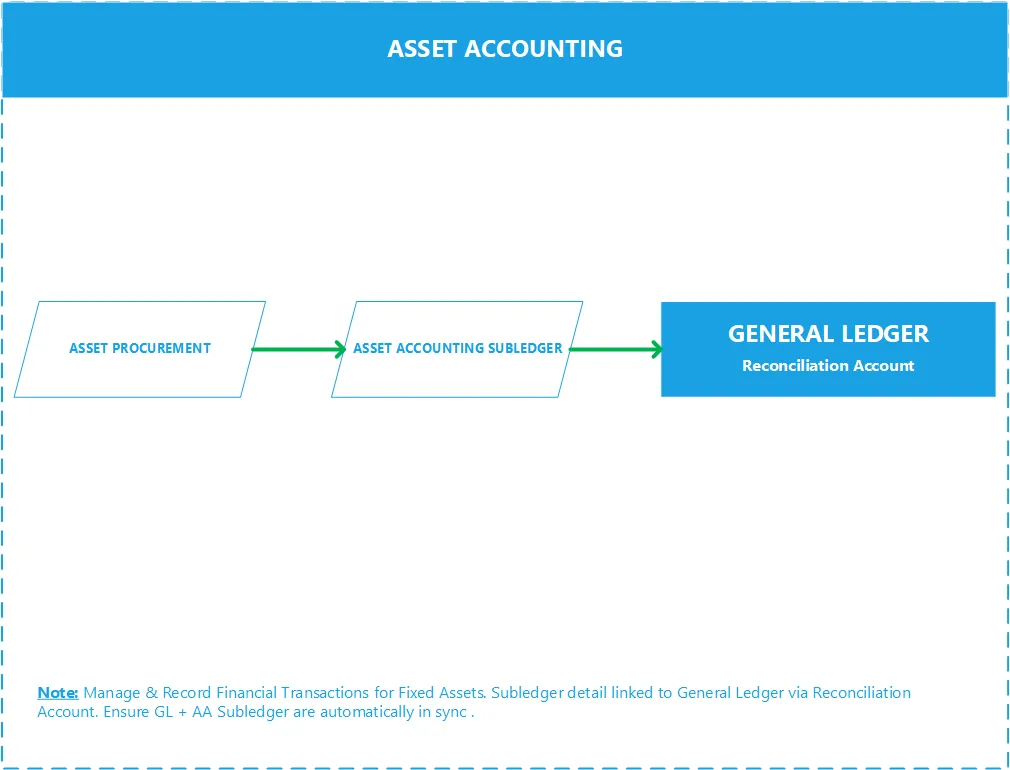
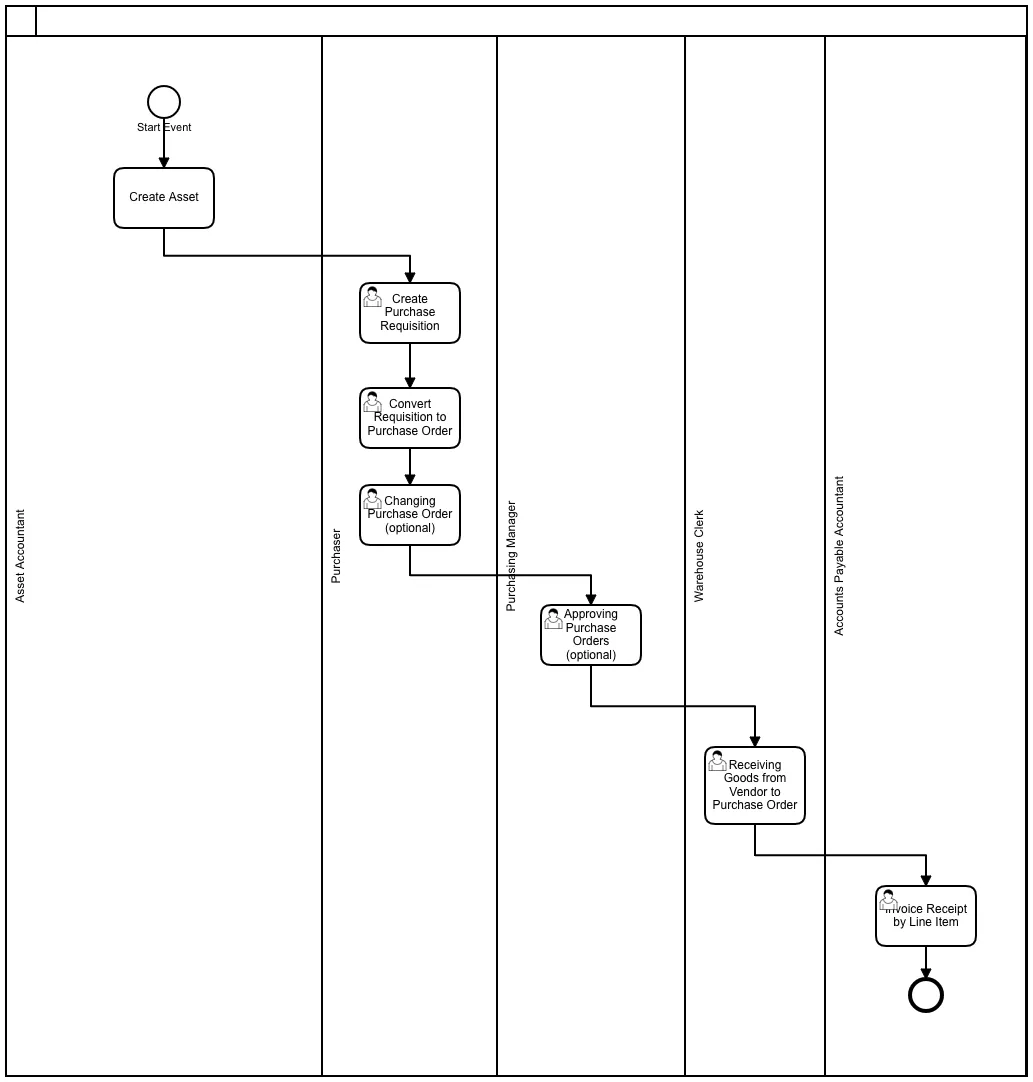
Asset Valuation:
Section titled “Asset Valuation:”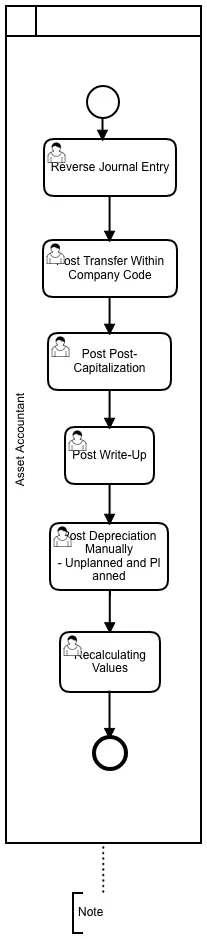
Asset Retirement:
Section titled “Asset Retirement:”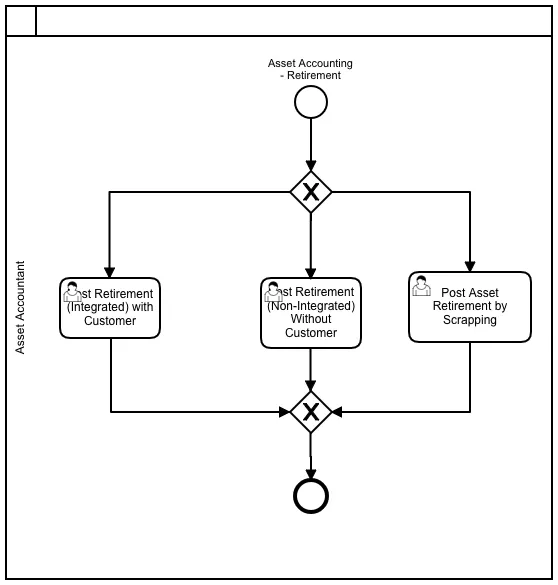
Asset Month End Close:
Section titled “Asset Month End Close:”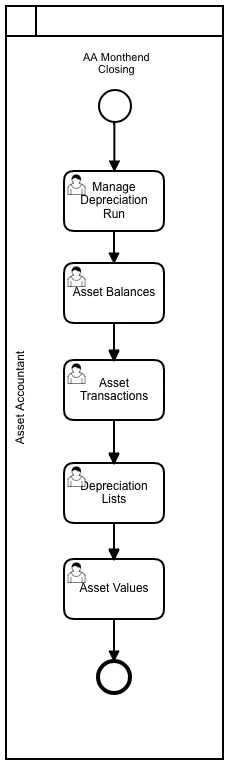
Asset Year End Close:
Section titled “Asset Year End Close:”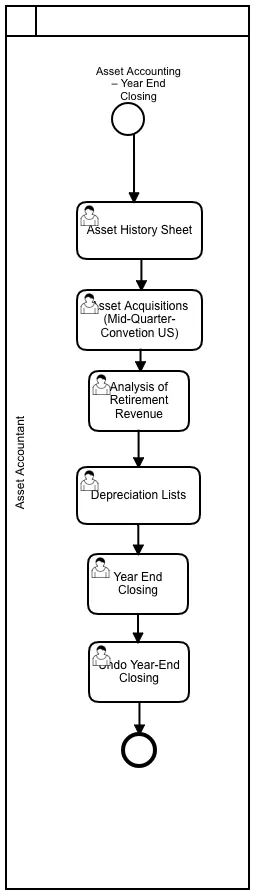
SAP Best Practices Assets Account Structure:
Section titled “SAP Best Practices Assets Account Structure:”Show extracted text
1/19/2021https://help.sap.com/http.svc/dynamicpdfcontentpreview?deliverable_id=23188577&topics=da47dc0cae0a49098b4ce705f3d… 2/7919330000 - GoodwillG/L Account Number(I_SAKNR)19330000G/L Acct Long Text (SKAT) GoodwillG/L Account Group ANL.Balance/ P&L Account BalanceAccount Category Fixed AssetAccount Purpose Reconcil. Account, assigned to asset classesAccount Hierarchy Level ASSETS | NON-CURRENT ASSETS | INTANGIBLE ASSETS | GoodwillUsed in Conguration or MasterDataXWhere Used in the GlobalAccount Determination orMaster DataBalance sheet accounts for depreciation areasAccount Usage In the documentation group for Goodwill, the following accounts are described:G/L Account Number(I_SAKNR)G/L Acct Long Text (SKAT)19330000 Goodwill19430000 Amortization - GoodwillProcess Related Information Mr. Black acquires a company. The purchase price includes the goodwill of 300000 EUR.Mr. Black posts the acquisition of a company.Up to this point there is agreement on trade and tax law. Due to the different depreciation, differencesarise from the year of acquisition, because the duration of depreciation in the trading and tax balancesis different.Example - Germany:For goodwill, the goodwill should be amortized over 15 years.Under commercial law, the 300000 EUR is depreciated over 10 years. If there is no possibility toestimate the estimated useful life, this is to be applied at 10 years.Depreciation:Dep. LocalGaapDep.for TaxlawDifference DeferredtaxesDep. 1st year 30000 EUR 20000 EUR 10000 EUR 3000 EURDep. 2nd year 30000 EUR 20000 EUR 10000 EUR 3000 EURDep. 3rd year 30000 EUR 20000 EUR 10000 EUR 3000 EURDep. 4th year 30000 EUR 20000 EUR 10000 EUR 3000 EURDep. 5th year 30000 EUR 20000 EUR 10000 EUR 3000 EURDep. 6th year 30000 EUR 20000 EUR 10000 EUR 3000 EURDep. 7th year 30000 EUR 20000 EUR 10000 EUR 3000 EUR1/19/2021https://help.sap.com/http.svc/dynamicpdfcontentpreview?deliverable_id=23188577&topics=da47dc0cae0a49098b4ce705f3d… 3/79Dep. 8th year 30000 EUR 20000 EUR 10000 EUR 3000 EURDep. 9th year 30000 EUR 20000 EUR 10000 EUR 3000 EURDep. 10th year 30000 EUR 20000 EUR 10000 EUR 3000 EURDep. 11-15 year 0 EUR 100000 EUR 100000 EUR 30000 EURStand 31.12. after 15 years 0 EURPosting Examples Acquistion of the company:Debit Credit19330000Goodwill 300000 EUR 11001000 - Bank 1 - Bank (Main) Account300000 EURDepreciation of Goodwilla) Local GaapDebit Credit19430000 Amortization of Goodwil20000 EUR19330000Goodwill 20000 EURb) Tax law:Debit Credit19430000 Amortization of Goodwill3000 EUR19330000Goodwill 30000 EUR19430000 - Amortization - GoodwillG/L Account Number(I_SAKNR)19430000G/L Acct Long Text (SKAT) Amortization - GoodwillG/L Account Group ANL.Balance/ P&L Account BalanceAccount Category Fixed AssetAccount Purpose Reconcil. Account, assigned to asset classesAccount Hierarchy Level ASSETS | NON-CURRENT ASSETS | INTANGIBLE ASSETS | GoodwillUsed in Conguration or MasterDataXWhere Used in the GlobalAccount Determination orMaster DataFI-AA - G/L accounts value adjustmentAccount Usage In the documentation group for Goodwill, the following accounts are described:1/19/2021https://help.sap.com/http.svc/dynamicpdfcontentpreview?deliverable_id=23188577&topics=da47dc0cae0a49098b4ce705f3d… 4/79G/L Account Number(I_SAKNR)G/L Acct Long Text (SKAT)19330000 Goodwill19430000 Amortization - GoodwillProcess Related Information Mr. Black acquires a company. The purchase price includes the goodwill of 300000 EUR.Mr. Black posts the acquisition of a company.Up to this point there is agreement on trade and tax law. Due to the different depreciation, differencesarise from the year of acquisition, because the duration of depreciation in the trading and tax balancesis different.Example - Germany:For goodwill, the goodwill should be amortized over 15 years.Under commercial law, the 300000 EUR is depreciated over 10 years. If there is no possibility toestimate the estimated useful life, this is to be applied at 10 years.Depreciation:Dep. LocalGaapDep.for TaxlawDifference DeferredtaxesDep. 1st year 30000 EUR 20000 EUR 10000 EUR 3000 EURDep. 2nd year 30000 EUR 20000 EUR 10000 EUR 3000 EURDep. 3rd year 30000 EUR 20000 EUR 10000 EUR 3000 EURDep. 4th year 30000 EUR 20000 EUR 10000 EUR 3000 EURDep. 5th year 30000 EUR 20000 EUR 10000 EUR 3000 EURDep. 6th year 30000 EUR 20000 EUR 10000 EUR 3000 EURDep. 7th year 30000 EUR 20000 EUR 10000 EUR 3000 EURDep. 8th year 30000 EUR 20000 EUR 10000 EUR 3000 EURDep. 9th year 30000 EUR 20000 EUR 10000 EUR 3000 EURDep. 10th year 30000 EUR 20000 EUR 10000 EUR 3000 EURDep. 11-15 year 0 EUR 100000 EUR 100000 EUR 30000 EURStand 31.12. after 15 years 0 EURPosting Examples Acquistion of the company:Debit Credit19330000Goodwill 300000 EUR 11001000 - Bank 1 - Bank (Main) Account300000 EURDepreciation of Goodwilla) Local GaapDebit Credit19430000 Amortization of Goodwil 19330000Goodwill 20000 EUR1/19/2021https://help.sap.com/http.svc/dynamicpdfcontentpreview?deliverable_id=23188577&topics=da47dc0cae0a49098b4ce705f3d… 5/7920000 EURb) Tax law:Debit Credit19430000 Amortization of Goodwill3000 EUR19330000Goodwill 30000 EUR16008000 - Computer SoftwareG/L Account Number(I_SAKNR)16008000G/L Acct Long Text (SKAT) Computer SoftwareG/L Account Group ANL.Balance/ P&L Account BalanceAccount Category Fixed AssetAccount Purpose Reconcil. Account, assigned to asset classesAccount Hierarchy Level ASSETS | NON-CURRENT ASSETS | INTANGIBLE ASSETS | Intangible assetsUsed in Conguration or MasterDataXWhere Used in the GlobalAccount Determination orMaster DataBalance sheet accounts for depreciation areasAccount Usage In the documentation group for Intangible Assets, the following accounts are described:G/L Account Number (I_SAKNR) G/L Acct Long Text (SKAT)16008000 Computer Software16011500 Input Tax Clearing Intangibles DownPayments made17008000 Accumulated Depreciation - ComputerSoftware19310000 Internal Development19320000 Intangible Assets19410000 Accumulated amortization - InternalDevelopment19420000 Accumulated depreciation - IntangibleAssetsIntangible Assets, such as patents, are managed in the same way as tangible assets in the system.There are no special system functions for handling the requirements of intangible assets.Process Related Information Example- Asset acquisition, Computer SoftwareTest script for J62Process step Acquisition without Order (Integrated AP)1/19/2021https://help.sap.com/http.svc/dynamicpdfcontentpreview?deliverable_id=23188577&topics=da47dc0cae0a49098b4ce705f3d… 6/79In this activity, you can post an asset acquisition without a purchase order directly against a vendor aspart of your daily business.Example- intangible assetsCompany A Ltd. is re-designing its website in 2017. The Company A Ltd. will incur the following costs:Conception andlayout14520 EURProgramming ofcompany data15800 EUROnline shop foronline orders44400 EUR= Total costs 74720 EURThe development of conception and layout (EUR 14520) and the programming of company-related data(EUR 15800) do not lead to an asset because another company can not use this data for its ownpurposes.The expenses for the conception, layout and programming of company-related data (EUR 14520 EUR +15800 EUR) EUR 30320 must be booked as an expense in any case and the expenses for the Internetsales shop can be recorded immediately as operating expenses.Posting Examples Intangible Assets:Debit Credit19320000 Intangible Assets 74720 EUR 7777 -Vendor Company A-Switzerland (21200000Payables Foreign) 74720 EURAcquistion of Computer Software:Debit Credit16008000 Computer Software 12000 EUR 7777 -Vendor Company A-Switzerland (21200000Payables Foreign) 12000 EUR16011500 - Input Tax Clearing Intangibles Down Payments madeG/L Account Number(I_SAKNR)16011500G/L Acct Long Text (SKAT) Input Tax Clearing Intangibles Down Payments madeG/L Account GroupTables:
Section titled “Tables:”| Table | Name | S/4HANA - Notes |
|---|---|---|
| ANLA | Asset Master Record Segment | |
| ANLB | Depreciation terms | In Logical Database ADA. |
| ANLI | Link table for investment measure -> AuC | |
| ANLT | Asset Texts | |
| ANLU | Asset Master Record: User Fields | |
| ANLZ | Asset Allocations | Acc. Assign. for DEP, Gain/Loss from asset sales - Logical Database ADA |
| T087 | Evaluation groups | |
| ANEA | Asset Line Items for Proportional Values | |
| ANEK | Document Header Asset Posting | In Logical Database ADA. |
| ANEP | Asset Line Items | |
| ANLC | Asset Value Fields | |
| ANLH | Main asset number | |
| ANLP | Asset Periodic Values | In Logical Database ADA. |
| ANLW | Insurable values (year dependent) | |
| ANLX | Asset Master Record Segment | |
| BKPF | Accounting Document Header | In Logical Database BMM BRF BRM DDF KDF SDF. |
| BSEG | Accounting Document Segment | In Logical Database BMM BRF BRM DDF KDF SDF. |
| TABA | Depreciation posting documents | Current status of depreciation and amortization. |
| VBKPF | Document Header for Document Parking | |
| VBSEGA | Document Segment for Document Parking - Asset Database | |
| BSEG_ADD | Entry View of Accounting Document | When the document is not relevant for the leading ledger. |
| FAGLFLEXA | General Ledger: Items | |
| FAGLFLEXP | General Ledger: Plan Line Items | |
| FAGLFLEXT | General Ledger: Totals | |
| ACDOCA | Universal Journal Entry Line Items | |
| ACDOCC | Consolidation Journal | |
| ACDOCP | Plan Data Line Items | |
| FAAT_DOC_IT | Statistical Line Item in Asset Accounting | |
| FAAT_PLAN_VALUES | Planned Depreciations and Revaluations | |
| FAAT_YDDA | Year-Dependent Attributes for Depreciation | |
| T001B | Permitted Posting Periods | |
| T093 | Real and derived depreciation areas | |
| T093A | Real depreciation area | |
| T093B | Company code-related depreciation area specifications | Closed Asset-fiscal year. S/4:Edit with transaction FAA_CMP. |
| T093C | Company codes in Asset Accounting | Fiscal year change. |
| T093D | Control dep. posting | Depriciation. |
| T096 | Chart of depreciation | |
| ANKA | Asset classes: general data | |
| ANKB | Asset class: depreciation area | |
| ANKT | Asset classes: Description | |
| NRIV | Number Range Intervals | Edit with transaction SNUM. Object=ANLANR for assets |
| T003 | Document Types | Document Types AA, AP und AF for Asset Accounting. |
| T082A | Field string asset master record maintenance | |
| T082B | Field groups assets definition | |
| T082G | Field strings for screen selection asset master data | |
| T082L | Summary of logical field groups | |
| T082T | Names For Field Groups | |
| T087 | Evaluation groups | |
| T090NA | Depreciation Keys | |
| T090NAZ | Depreciation Keys - Method Assignment | |
| T090NP | Period Control Method | |
| T090NR | Base Method | |
| T095 | Balance sheet accounts for depreciation areas | |
| T095B | G/L accounts value adjustment | |
| T095P | Reconcil.accts. derived dep. areas | |
| TABW | Asset transaction types | |
| TABWA | Transaction types/dep. areas | |
| TABWT | Asset transaction types texts | |
| ------- | ------ | ----------------- |
Transactions:
Section titled “Transactions:”| ECC Tr. | S4 Tr. | Description |
|---|---|---|
| ABST | ABSTL | Asset reconciliation |
| AB01 | AB01L | Create asset transaction |
| ABAA | ABAAL | Unplanned depreciation |
| ABAKN | ABAKNL | Last Retirement on Group Asset |
| ABAO | ABAOL | Asset Sale Without Customer |
| ABAV | ABAVL | Asset Retirement by Scrapping |
| ABAW | ABAWL | Balance sheet revaluation |
| ABCO | ABCOL | Adjustment Posting to Areas |
| ABGF | ABGFL | Credit Memo in Year after Invoice |
| ABGL | ABGLL | Enter Credit Memo in Year of Invoice |
| ABIF | ABIFL | Investment support |
| ABMA | ABMAL | Manual depreciation |
| ABMR | ABMRL | Manual transfer of reserves |
| ABNA | ABNAL | Post-capitalization |
| ABNE | ABNEL | Subsequent Revenue |
| ABNK | ABNKL | Subsequent Costs |
| ABSO | ABSOL | Miscellaneous Transactions |
| ABUM | ABUML | Transfer From |
| ABZE | ABZEL | Acquisition from in-house production |
| ABZO | ABZOL | Asset acquis. autom. offset. posting |
| ABZP | ABZPL | Acquistion from affiliated company |
| ABZU | ABZUL | Write-up |
| ----------------- | -------------- | -------------- |
Programs, Function Modules and Exits:
Section titled “Programs, Function Modules and Exits:”| Programs | Description | Type |
|---|---|---|
| AW01N | Asset Explorer | AA |
| RAPOST2000 | Depreciation Posting Run | AA |
| RAALTD01 | Legacy Data Transfer Program Asset Accounting | AA |
| SAPMA01B | ?… | AA |
| RACSTABL | Asset Customizing: Calling Up Different Views | AA |
| RAVCLUST | FI-AA: Call of view clusters | AA |
| RAFABNEW | Automatic Opening of a New Depreciation Area | AA |
| RABEST_ALV01 | Asset Balances | AA |
| RAUMFE20 | Analysis of an asset and its environment: Data collect. and analysis | AA |
| RAALTD11 | Direct Data Import Asset Accounting | AA |
| RAAFAR00 | Recalculate Depreciation | AA |
| RASIMU02 | Depreciation Simulation | AA |
| RAPERB2000 | Periodic Asset Postings | AA |
| RAGITT_ALV01 | Asset History Sheet | AA |
| RAGITT01 | Asset History Sheet | S_ALR_87011990 |
| RAUNVA00 | Incomplete Assets Detail List | AA |
| ----------------- | -------------- | -------------- |
Role-based Fiori Apps:
Section titled “Role-based Fiori Apps:”- Asset Balances (Design Studio)
- Asset History Sheet (Design Studio)
- Asset Transactions
- Depreciation Lists
- Manage Fixed Assets
Platforms:
Section titled “Platforms:”| ECC | S/4 HANA | U/X | Database |
|---|---|---|---|
| SAP ERP | SAP S/4 HANA | SAP FIORI | SAP HANA |
| -------------- | -------------- | --------------- | --------------- |
Note: S/4 (cloud & on-premise) works only on Hana DB while SAP ERP is compatible with Hana DB, MS Sql, Oracle DB, IBM DB2 etc.
Asset Accounting Doc:
Section titled “Asset Accounting Doc:”Show extracted text
SAPASSET ACCOUNTINGSajiv FrancisJune 2020Table of ContentsSAP ASSET ACCOUNTING ................................ ................................ ................................ ............... 3Configuration Document ................................ ................................ ................................ ......................... 3ASSETS MASTER DATA PROCESSING ................................ ................................ .............................. 4Create asset................................ ................................ ................................ ................................ ............ 4Change asset master ................................ ................................ ................................ ............................. 14Changes of cost center ................................................................................................................................................... 15Display asset master ................................ ................................ ................................ ............................. 17To display asset master .................................................................................................................................................. 18To view asset values ................................ ................................ ................................ ............................. 20ASSET ACCOUNTING- BUSINESS TRANSACTIONS ................................ ................................ .......... 21Asset Acquisition (Capitalization of Asset) ................................ ................................ ............................. 21Overview ........................................................................................................................................................................ 21Reverse Asset Document ................................ ................................ ................................ ...................... 24Periodic Processing ................................ ................................ ................................ ............................... 25Depreciation Run ........................................................................................................................................................... 25ASSET ACCOUNTING INFORMATION SYSTEMS ................................ ................................ ............. 31Standard Sap Reports ................................ ................................ ................................ ........................... 31ASSET RETIREMENT................................ ................................ ................................ ..................... 32Overview ................................ ................................ ................................ ................................ ............. 32Asset Retirement with transaction code ABAVN ................................ ................................ ................. 32ASSET ACQUISITION-SAP ................................ ................................ ................................ ............. 36Overview ................................ ................................ ................................ ................................ ............. 36Asset Acquisition with transaction code ABZON................................ ................................ ................. 36ASSET HISTORY SHEET ................................ ................................ ................................ ................. 40Report Scenario ............................................................................................................................................................ 40Report Execution .......................................................................................................................................................... 40Configuration................................................................................................................................................................ 41AA – ASSET EXPLORER ................................ ................................ ................................ ................. 42Overview ................................ ................................ ................................ ................................ ............. 42Exploring an asset with Transaction Code AW01n................................ ................................ .............. 42AA – LEGACY MIGRATION GUIDE ................................ ................................ ................................ . 48STEPS IN ASSET ACCOUNTING: ................................ ................................ ................................ .... 49AA- ACCOUNTING ENTRIES ................................ ................................ ................................ .......... 51SAP ASSET ACCOUNTING Configuration DocumentStep by step customization/configuration instructions related to Asset Accounting submodule in SAPFI. Following are headlines from the document;• Organizational Structures ConfigurationIn this section features of the Asset Accounting organizational objects (chart of depreciation, FIcompany code, asset class) are defined. All assets in the system are assigned to these organizationalobjects that you defined.• Integration with General Ledger A090The system settings and entries you make in this section are required for the integration of AssetAccounting with the General Ledger• Valuation ConfigurationIn this section, all configurations that have to do with the valuation of fixed assets are made. Wedefine and manage all valuation and depreciation parameters in the chart of depreciation• Depreciation ConfigurationThe settings for fixed assets depreciation are defined in this section.• Special Valuation Configuration• Master Data Configuration• Transaction Types ConfigurationClick on below mentioned link to view full SAP Asset Accounting configuration DocumentASSETS MASTER DATA PROCESSINGCreate assetAccess transaction by:Via Menus Accounting→Financial Accounting→Fixed assets→Asset→Create→ AssetVia Transaction Code AS01On screen “Create Asset: Initial Screen”, enter information in the fields as specified in the table below:Field Name Description R/O/C CommentsAsset class Classification of the asset R Use drill-down to locate theasset classCompany code Enter “FBR” RField Name Description R/O/C CommentsNumber ofsimilar assetsNumber of similar assets that you want to create inthe system when you save.O This function enables you tocreate multiple similarassets in one mastertransaction. These assetsinitially only differ in theirasset numbers. When yousave, you can also enter adescription and inventorynumber for each individualrecord.Reference:AssetSub-numberCompanycodeThe reference asset that you are copying from OPress <Enter> or click onOn screen “Create Asset: Master Data”, enter information in the fields as specified in the table below:Field Name Description R/O/C CommentsDescription The description of the asset RAsset main no text One line description of the asset.It will appear in reporting.O If leave blank, the first line ofdescription will be copied over to thisfield.Serial Number Enter the manufacturer Number OInventory no You must enter an inventory number forthe asset. The inventory is output in thestandard inventory list for AssetAccounting (Information System).OLast inventory on You can enter the date of the last inventory. O This field is for information onlyInclude assets ininventory list.Set this indicator if you want this asset tobe counted in a physical inventory check.O This indicator ensures that this asset isincluded in the standard inventory listof Asset Accounting. Asset without this Chat with Sajiv